Odoo Website Order Note - Delivery Date

€15.00
Tax excluded

Introducing the Website Order Note - Delivery Date app, designed to streamline the ordering process and improve customer interactions. This tool empowers administrators to allow customers to easily provide order notes and select their preferred delivery dates during the checkout process, enhancing communication and satisfaction.

WATCH DEMO VIDEO

Technical Support
Quantity
  Return policy

10-day module exchange guarantee

  • The Website Order Note app is designed to streamline the ordering process and enhance customer interactions in Odoo. 
  • This app allows customers to easily include order notes and select preferred delivery dates during the checkout process.
  • By allowing customers to provide important order details, the app improves communication between the business and its customers, ensuring that specific requirements are met and enhancing overall satisfaction.
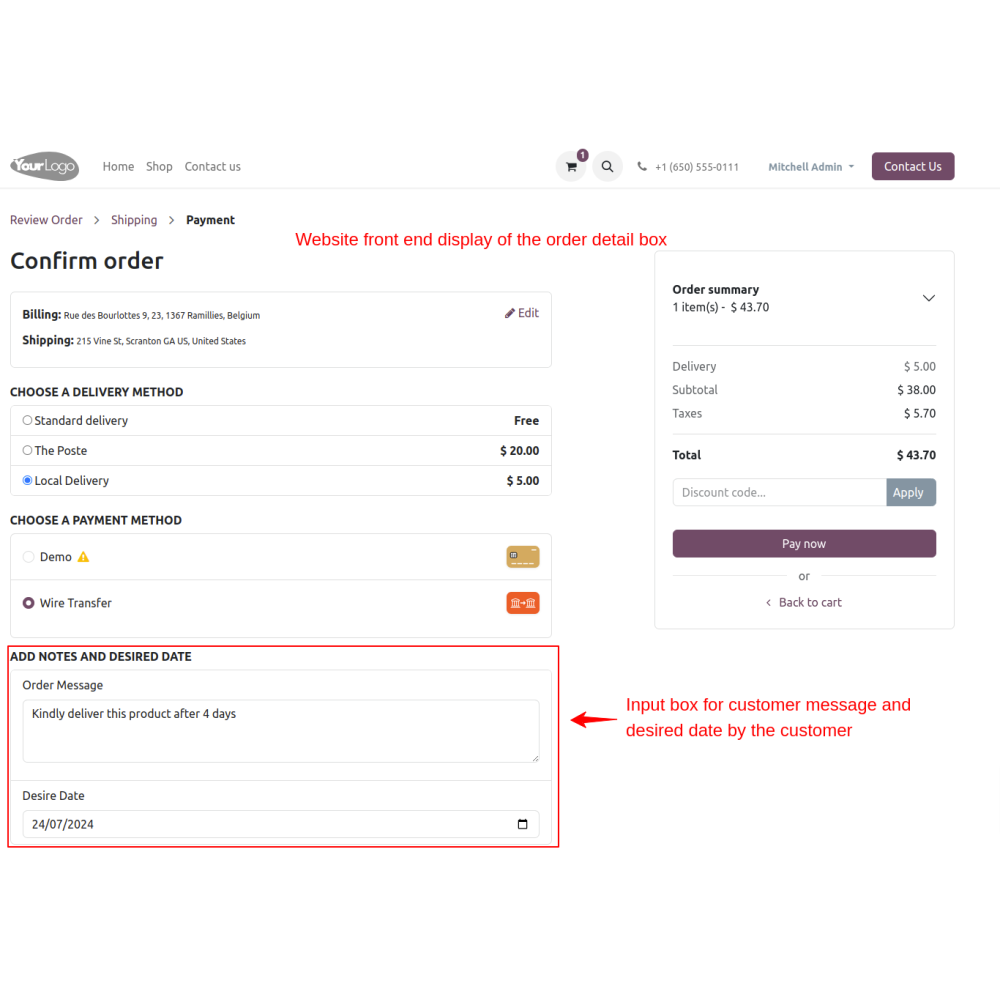
  • Customers can add personalized order notes during the checkout process. This feature allows them to communicate special requests, preferences, or instructions directly related to their orders.
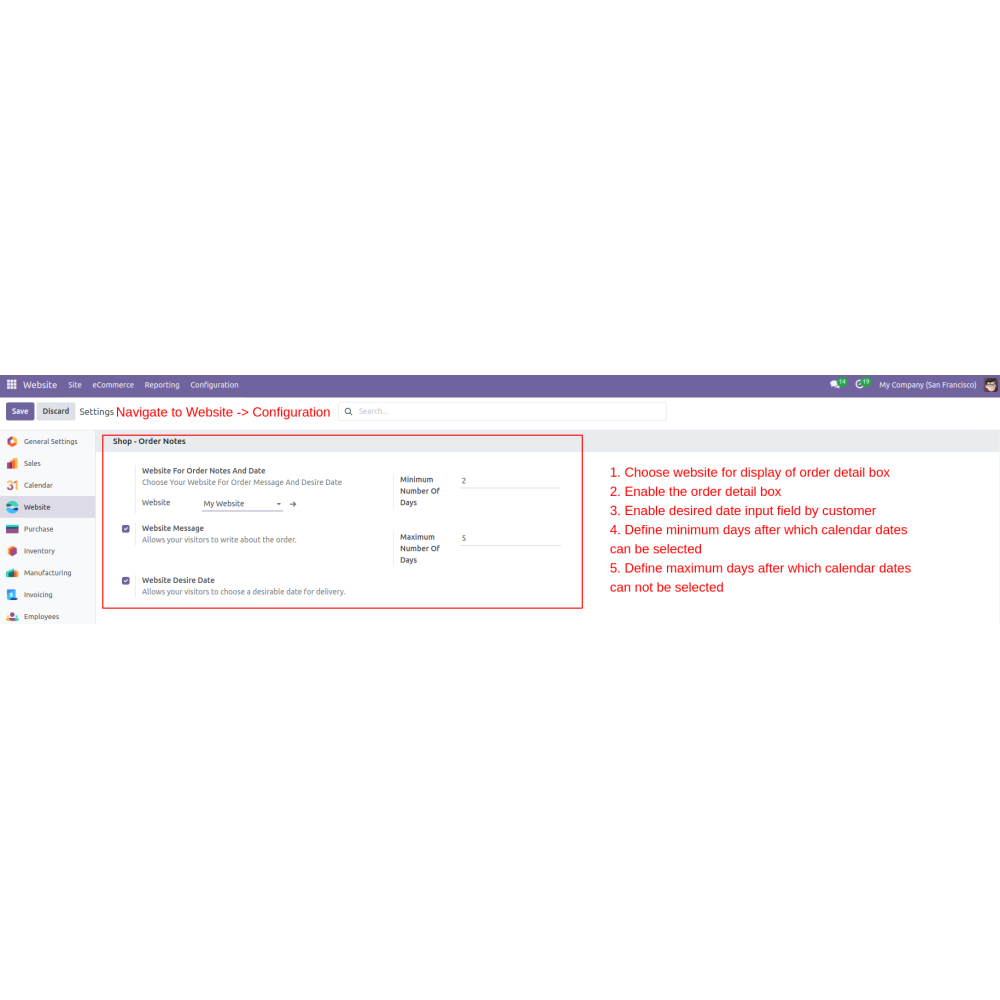
  • Admins can specify which websites allow customers to input order details, providing flexibility in managing multiple store locations or platforms within Odoo.
  • Admins have the option to enable or disable the order detail box based on business requirements. This feature allows customization of the checkout process according to specific needs.
  • Customers can choose their preferred delivery date from a user-friendly calendar input. This streamlined selection process enhances the overall ordering experience and reduces confusion.
  • Admins can set minimum and maximum days for date input eligibility, ensuring that selected delivery dates are practical and aligned with business operations.
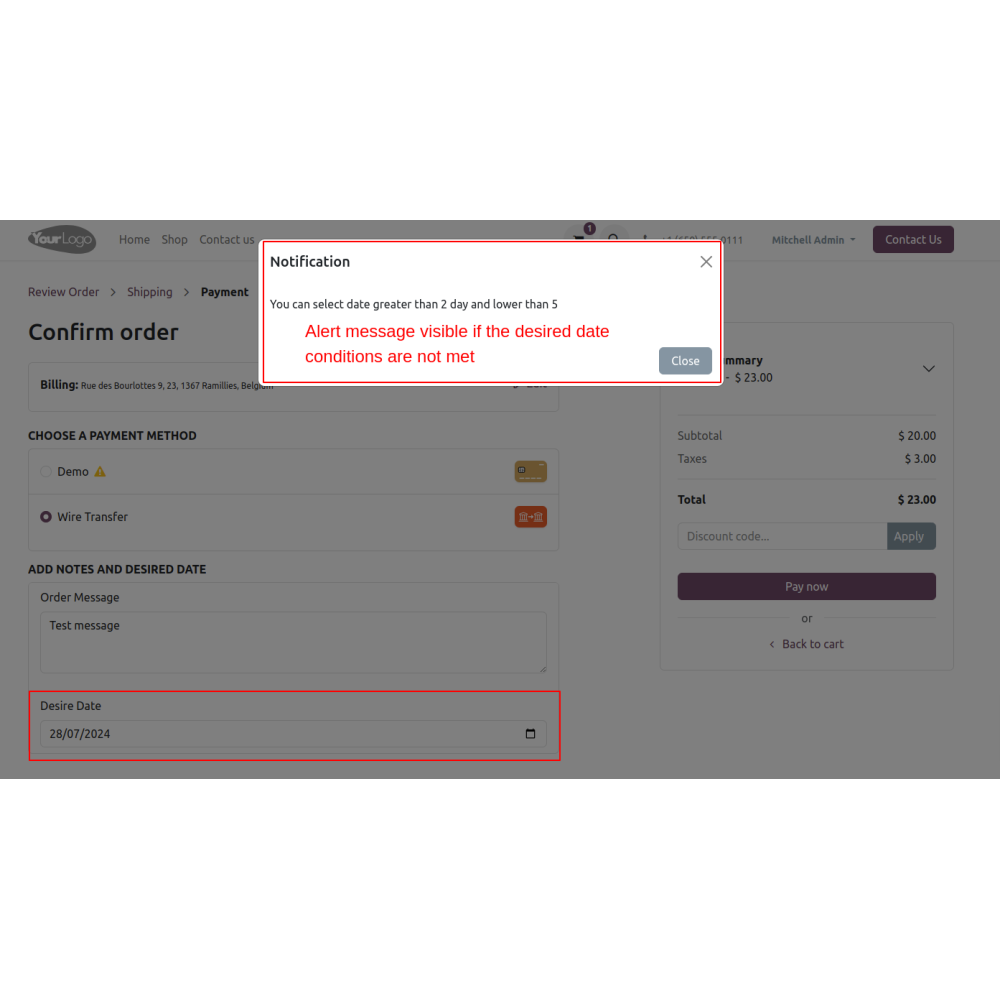
  • Customers receive alerts if their date input does not meet the required constraints, prompting them to make timely adjustments and preventing mistakes in delivery date selection.
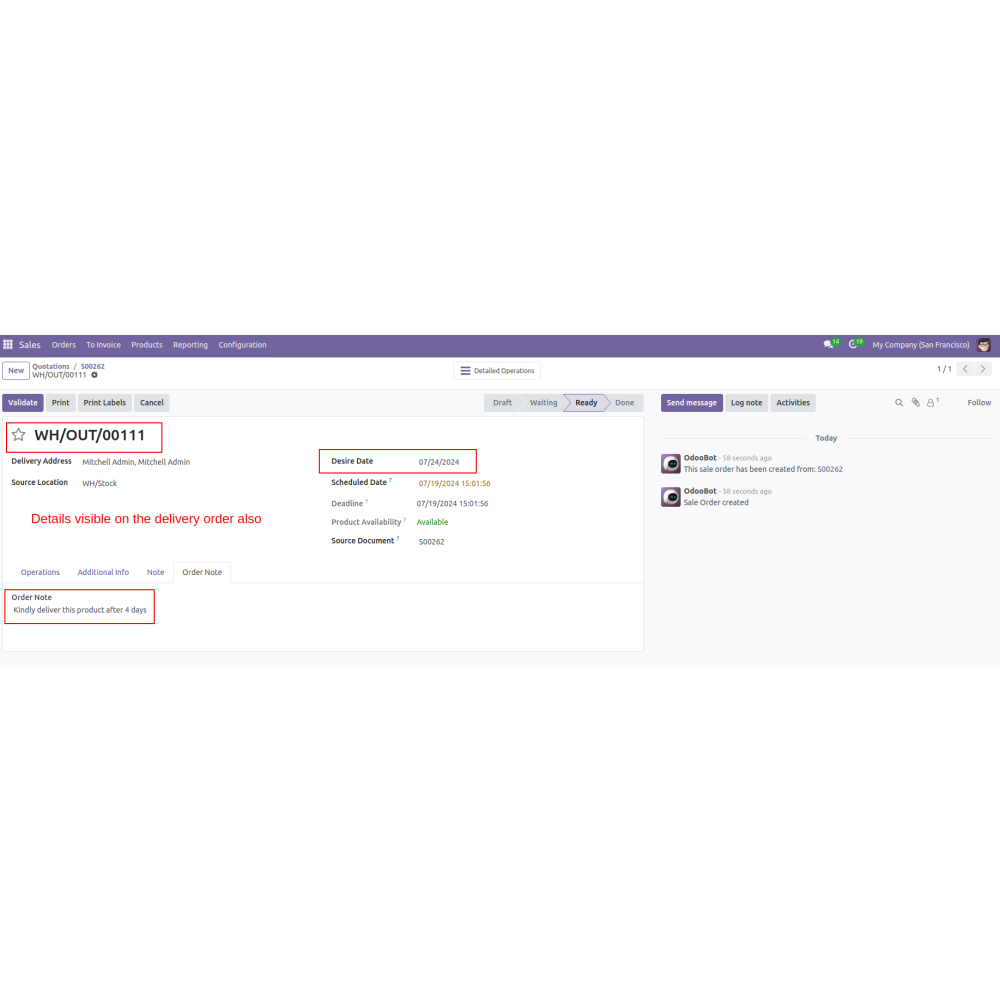
  • Customer inputs, including order notes and chosen delivery dates, are displayed on the order details page, ensuring transparency and easy access for both customers and admins.
  • The app showcases customer inputs on delivery slips, providing comprehensive tracking of order details from purchase through delivery. This enhances order fulfillment accuracy and customer confidence.
  • Provides clear, timely updates on delivery dates, improving overall customer satisfaction.
  • Allows customers to specify delivery dates, making order fulfillment more tailored and flexible.
  • Simplifies tracking and managing delivery dates for smoother operations and planning.
  • Ensures accurate delivery scheduling, reducing delays and boosting customer trust.
  • Provides clear visibility of delivery dates and order statuses for both customers and staff.
  • Minimizes mistakes by clearly defining and communicating delivery expectations.
  • Admin configures which websites allow customers to add order notes and select delivery dates.
  • Enables the order note input and delivery date options in the checkout process.
  • During checkout, customers can type their special instructions or requests in the order note box.
  • They select their preferred delivery date from a calendar interface.
  • Admins set minimum and maximum delivery days.
  • Customers receive alerts if their chosen date doesn’t meet the set restrictions, prompting corrections.
  • Customer inputs, including notes and delivery date, are shown on the order summary page for review.
  • Orders are confirmed with all selected details.
  • The order details, notes, and delivery date are visible on the order details page for both customers and staff.
  • The agreed delivery date and notes are used to fulfill orders accurately.
What is the Website Order Note app?The Website Order Note app allows customers to add special instructions and select delivery dates during checkout, improving communication and order accuracy. It helps businesses customize the checkout experience, track orders transparently, and reduce errors by capturing detailed customer preferences and delivery info at the point of sale.
How do customers add notes and select delivery dates?Customers can input personalized notes and pick a preferred delivery date from a calendar during checkout, ensuring their requirements are met.
Can the date input be restricted?Yes, admins can set minimum and maximum days for delivery, and customers will receive alerts if their selected date is outside the allowed range.
Where can I view customer inputs?Customer notes and delivery dates are visible on the order details page and included on delivery slips for transparency and accurate fulfillment.
How to configure delivery date options?Admins can customize which websites allow date input and enable or disable the order detail box based on business needs.
How does the system improve order management?By capturing detailed customer instructions and preferred delivery dates, it reduces errors, enhances customer satisfaction, and ensures timely order fulfillment.
What kind of support do you offer after module purchase?We provide technical support to resolve installation, configuration, and functionality-related issues. Support details are outlined in our support policy. We also customize our Odoo App to meet your business needs.
Do your Odoo extensions support multi-language functionality?Yes, our modules are designed to be multi-language. Follow the provided guidelines to configure language settings within Odoo.
What versions of Odoo are compatible with your extensions?Our extensions are regularly updated to support the latest stable Odoo versions. For compatibility details, refer to the product description page.

Customer reviews

5 Out Of 5
5 star
100%
4 star
0%
3 star
0%
2 star
0%
1 star
0%

Top reviews


See all reviews

Enhanced communication and accurate delivery scheduling

Fewer Order Processing Errors

Clear Order Tracking

Efficient Order Management

Improved Customer Experience

Customized Ordering Experience

Enhanced Customer Communication

Customizable delivery date selection during checkout

Order Notes Input

Customers can add personalized notes during checkout for special instructions, enhancing communication and order accuracy.

Website Selection Flexibility

Admins can specify which websites allow delivery date inputs, providing tailored management across multiple platforms.

Customizable Detail Box

Admins can enable or disable the order detail box at checkout, tailoring the user experience to business needs.

Delivery Date Calendar

Customers select their preferred delivery date from a user-friendly calendar, improving ease of use and reducing errors.

Date Range Constraints

Admins can set minimum and maximum days for delivery dates, ensuring feasible scheduling and operational efficiency.

Order Transparency & Tracking

Customer inputs and delivery dates appear on order details and delivery slips, supporting transparency and precise order tracking.

Power Up Your  Store — We Handle It All

Related products