Odoo Email Delivery Order to Customer

€11.00
Tax excluded

The Email Delivery Order to Customer app lets admins send delivery orders via email automatically after confirmation, with a PDF attachment for clear communication.

WATCH DEMO VIDEO

Technical Support
Quantity
  Return policy

10-day module exchange guarantee

  • The Email Delivery Order to Customer app simplifies the process of notifying customers about their deliveries. 
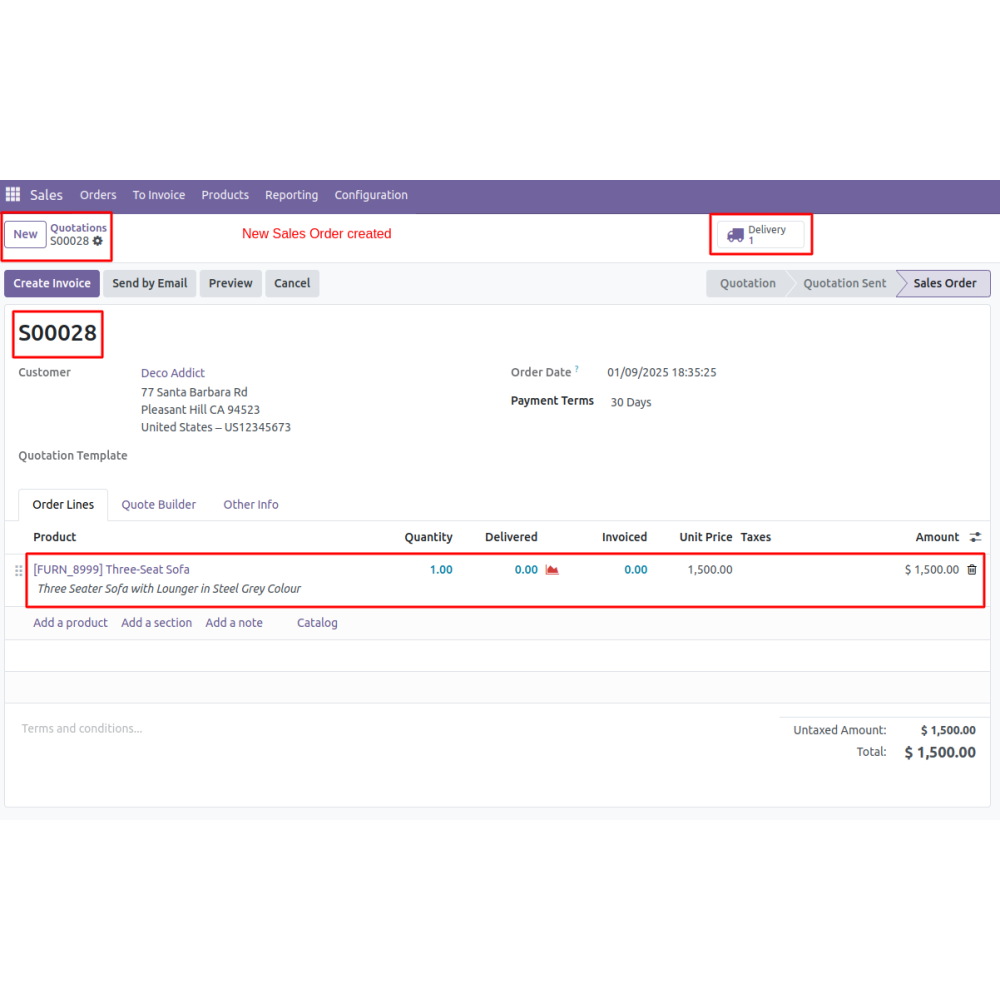
  • Once a sales order is confirmed, admins can easily send the delivery order via email directly from the system.
  • The app automatically attaches a PDF of the delivery order, providing clear documentation. 
  • Admins can customize the email message to fit each customer, enhancing communication.
  • This streamlined workflow ensures timely updates, better customer service, and consistent order records, all while saving time and reducing manual work.
  • It makes managing delivery notifications more efficient and professional.
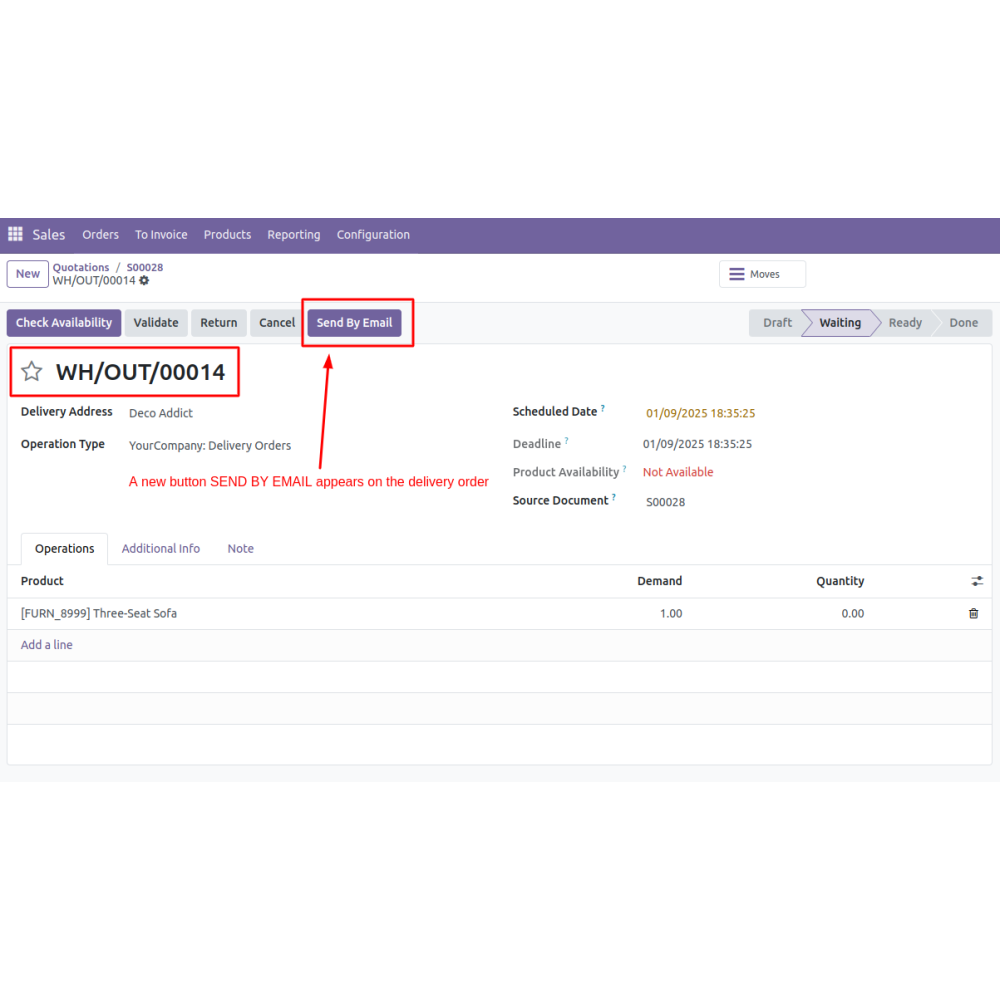
  • A “Send by Email” button is added to the delivery order interface.
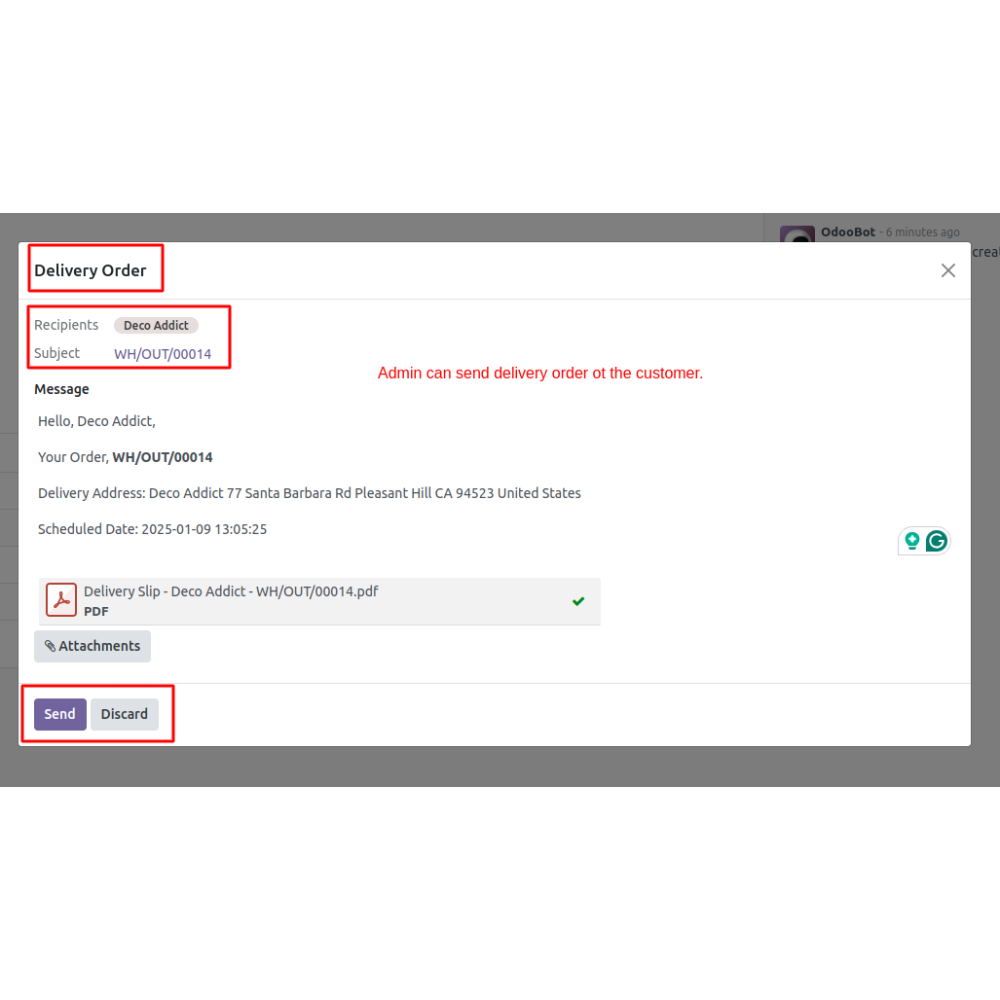
  • The app allows admins to adjust the pre-defined message body in the email, accommodating personalized communication with the customer for each delivery.
  • The delivery order PDF is automatically attached to the email, providing customers with detailed and clear documentation of their orders.
  • Simplify the process of notifying customers about their delivery status, enhancing customer service, and maintaining efficient communication.
  • Provides timely and clear updates to customers about their deliveries.
  • Automatically sends delivery emails after sales confirmation, reducing manual effort.
  • Allows admins to personalize email messages for each customer and delivery.
  • Enables quick retrieval of delivery details directly from the email and system.
  • Automatically attaches detailed PDFs of delivery orders for accurate records.
  • Streamlines the delivery notification process, saving time and improving productivity.
  • Once a customer’s sales order is confirmed, the system prepares the delivery document for sharing.
  • Navigate to the delivery order screen within Odoo where the new "Send by Email" button is available.
  • Press the button, which opens a pre-populated email draft with the delivery order PDF attached.
  • Edit the default message body if needed, adding any personalized notes or instructions for the customer.
  • Review the email and click send to deliver the delivery details directly to the customer’s email address.
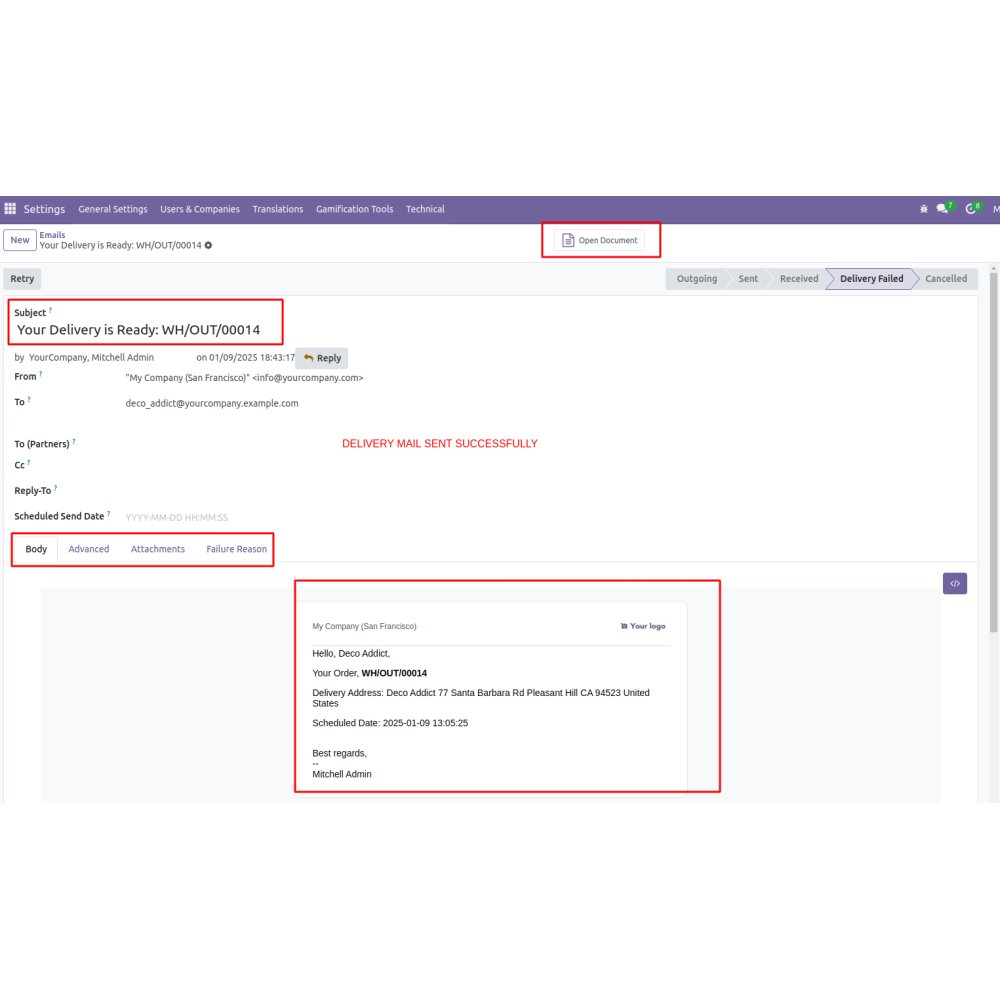
  • The system logs the email transaction and attachment for future reference, ensuring transparency and organized documentation.
What is the "Email Delivery Order to Customer" feature?This feature allows admins to send delivery orders directly to customers via email after a sales order is confirmed. It includes an easy-to-use button that automatically attaches a PDF of the delivery order and streamlines communication, ensuring customers receive timely updates and documentation of their orders.
How does the email process work?Admins click the "Send by Email" button on the delivery order page, customize the message if needed, and send the email. The system automatically attaches the delivery order PDF for clear order confirmation.
Can the email content be customized?Yes, admins can modify the predefined message body in the email to personalize communication with each customer for better engagement.
What is attached to the email?The delivery order PDF is automatically attached, providing customers with detailed and official documentation of their order and delivery details.
How does this improve customer service?It ensures quick, consistent communication, keeps customers informed, and reduces manual follow-ups, enhancing overall satisfaction.
Are records maintained of these emails?Yes, the system logs all email transactions and attachments for easy tracking and future reference, ensuring transparency and accountability.
What kind of support do you offer after module purchase?We provide technical support to resolve installation, configuration, and functionality-related issues. Support details are outlined in our support policy. We also customize our Odoo App to meet your business needs.
Do your Odoo extensions support multi-language functionality?Yes, our modules are designed to be multi-language compatible. Follow the provided guidelines to configure language settings within Odoo.
What versions of Odoo are compatible with your extensions?Our extensions are regularly updated to support the latest stable Odoo versions. For compatibility details, refer to the product description page.

Customer reviews

0.0 Out Of 5
5 star
0%
4 star
0%
3 star
0%
2 star
0%
1 star
0%

No customer reviews

Efficient Customer Order Notifications

Enhanced Customer Communication

Automated Email Processing

Personalized Email Customization

Quick Access to Delivery

Consistent Order Documentation

Improved Workflow Efficiency

Automated Email Delivery Order Notifications

Instant Email Sending

Adds a “Send by Email” button directly to delivery orders. Enables quick dispatch of order details with a single click, improving response times.

Personalized Email Content

Allows customization of the email message body. Facilitates tailored communication that can be adjusted for each customer and delivery.

Automatic PDF Attachment

Attaches the delivery order PDF automatically. Provides customers with a clear and comprehensive record of their order details.

Simplified Notifications

Streamlines the process of informing customers about delivery status updates. Timely and efficient communication enhances customer satisfaction.

Enhanced Delivery Workflow

Integrates email directly into delivery operations. Reduces manual work and improves overall workflow efficiency for delivery management.

Clear Documentation Delivery

Delivery information is well documented with attached PDFs. Supports accurate record-keeping and reduces inquiries.

Power Up Your  Store — We Handle It All

Related products