
Ready to Explore Our AI-Powered Management Solution?
Explore the complete solution for schools, coaching centers and educational institutes, discover its features, or discuss your project with our team.
One Platform. Multiple Experiences. One Shared Core.
This solution is designed to bring the essential digital operations of schools, coaching centers and educational institutes into one connected platform. Instead of managing the public website, student services, mobile experience and administration as separate systems, everything works through a shared Laravel backend and database.
The result is a connected environment where information can move between the different parts of the platform while each user gets an experience designed for their specific role.
How the Platform Works
Four connected experiences operate on top of the same application core.
Public Website
Present your institution, academics, admissions, fees, news, events, gallery and CMS-managed content.
Student Portal
Give students access to dashboards, attendance, fees, assignments and other portal services.
Mobile App
Provide a native Android and iOS experience for public information and student portal services.
Admin Panel
Control school settings, branding, students, fees, CMS content and administrative operations.
Laravel 13 + REST API + MySQL
All major client experiences communicate with the central Laravel application and shared data layer. This creates a consistent foundation for managing information across web, mobile and administrative interfaces.
Enter Information Once. Use It Across the Platform.
The platform is built around a shared backend and database. Public website content, student portal services, administrative information and mobile experiences communicate through the same application foundation rather than operating as isolated products.
The Right Experience for Every User
Administrators manage the platform, students access their portal, visitors explore the public website, and mobile users access the supported web and portal experiences through a dedicated native application.
Built for Web and Mobile from the Ground Up
Add AI Where Content Management Needs It
The Admin Panel includes an optional AI-assisted content generation capability. Administrators can configure an AI provider and generate supported content using a title, subtitle or summary, or provide their own custom prompt.
The Architecture in One View
Think of the platform as a central digital core with multiple experiences connected around it:
This architecture provides a clear separation between user-facing experiences and the central application layer while keeping the platform connected through a shared API and database.
You Bring the Server. We Handle the Setup.
Getting started does not mean figuring out the deployment process yourself. The solution is delivered as a production-ready application, and our team handles the installation and configuration in your production environment.
You provide the required server and domain environment. Once access is available, we deploy the application, configure the production environment and prepare the solution for use.
Installation in 4 Simple Steps
From your server environment to a deployed application, the process is straightforward.
Prepare Your Environment
Arrange the server and domain environment where the production application will be deployed.
Provide Server Access
Provide the required server access so our team can perform the deployment and production configuration.
We Deploy the Solution
Our team deploys the application in the production environment and configures the required application and database setup.
Go Live
After the production setup is completed, the deployed application is ready for your team to start using.
What You Need to Provide
A suitable production server environment for the application.
Your configured production domain for accessing the application.
The required access for our team to perform the deployment.
What We Handle
Deploy the solution to your configured production environment.
Configure the application's database as part of the deployment.
Configure the deployed application for the customer's production environment.
Complete the production setup and prepare the application for use.
Your Production Environment Becomes the Home of the Solution
The application is intended to run in the customer's configured production environment. Development or localhost addresses used during development are not the customer-facing application address.
Configure AI When You Are Ready
If AI content generation is enabled, the AI provider and API key can be configured from the deployed Admin Panel. The solution supports ChatGPT, Gemini and Claude, allowing the administrator to select the provider and configure the required model and API key.
Before You Start
The solution is delivered for deployment in a customer's production environment. Server and domain arrangements are the customer's responsibility, while deployment and production configuration are handled as part of the setup process. Specific server requirements should be confirmed with our team based on the intended deployment environment.
One Admin Panel. One Place to Manage Your Platform.
The Admin Panel is the operational center of the solution. It gives administrators a centralized environment for managing the institution's settings, branding, students, fees, CMS content and other administrative operations.
Instead of switching between disconnected tools, administrators can work from a single Laravel-based interface while the platform's shared backend keeps the different parts of the solution connected.
What Can the Admin Panel Control?
The administrative layer brings the core management areas together into one central workspace.
School & Institution Settings
Manage the core settings that define how the institution's platform operates.
Branding
Manage institution-specific branding and visual identity used throughout the platform.
Student Management
Manage student information and the data used by student-facing services.
Fees Management
Manage fee-related information and financial data connected to student services.
CMS Management
Manage website content including navigation, hero content, pages and other CMS-driven information.
AI Content Generation
Generate supported content using configured AI providers, titles, summaries or custom prompts.
Manage the Core. Power Every Experience.
The Admin Panel sits behind the platform's major user experiences. Information managed by administrators can feed the public website and student-facing services through the shared backend and API.
Keep Your Public Website Up to Date
CMS-driven content is served by the backend, allowing administrators to manage institution-specific website information such as navigation, hero content, logo, fees and pages.
Manage the Data Behind the Student Experience
The backend provides student portal APIs for services including the student dashboard, attendance, fees and assignments. This allows the administrative layer to support the information students access through the portal.
Create Content Without Starting From a Blank Page
The Admin Panel includes an optional AI Content Generation capability. Administrators can select an AI provider and generate supported content using a title, subtitle or summary, or provide a custom prompt for more specific instructions.
Administration With the Right Access Model
The Admin Panel uses Laravel session authentication, while student portal and mobile access use Laravel Sanctum bearer-token authentication.
Your Platform. Your Content. Your Control.
From the information displayed on your website to the data supporting student services, the Admin Panel provides the central management layer that keeps your digital platform under your control.
One Platform. Two Experiences. Built for Different Users.
The solution separates the public-facing experience from the student experience, so visitors can discover the institution while students can access their own services after authentication.
Both experiences are powered by the same Laravel backend and database, creating a connected platform while keeping each interface focused on what its users actually need.
Public Website
Your public website is the digital front door of your institution. It gives visitors access to important information and presents your institution through centrally managed content.
Present important information about your organization and its offerings.
Publish and provide access to admission-related information.
Present academic information through the public website.
Keep visitors informed with news and visual content.
Manage website pages and other institution-specific content through the administration layer.
Student Portal
The Student Portal is the authenticated area where students can access their own portal services without exposing those services to the public website.
Provide students with a dedicated dashboard after login.
Give students access to their attendance-related portal services.
Provide access to student fee-related information.
Give students access to assignment-related portal services.
Student portal access is protected through Laravel Sanctum authentication.
Your Website Content Starts in the Admin Panel
The public website is powered by CMS-driven content delivered from the backend. Administrators can manage institution-specific information and publish it through the public-facing experience.
One Backend Connecting Both Experiences
The public website and student portal are different interfaces, but they do not need separate application foundations.
Modern React Web Experience
The web application is built with React 19 and TypeScript, using Vite 8 for the application build and React Router 7 for navigation.
A Dedicated Experience After Login
The browser-based Student Portal uses the same React web technology and connects to the Laravel API using authenticated access.
Public Information vs. Student Information
Visitors can access public website information through the platform's public API endpoints.
Student portal services require authenticated access through Laravel Sanctum bearer tokens.
CMS-driven content is served from the backend, keeping the public experience connected to the administration layer.
A Better Digital Experience for Visitors and Students
The public website helps visitors discover and understand the institution, while the Student Portal provides authenticated access to student services. Behind both experiences is the same Laravel-powered application foundation.
Your Institution, Always Within Reach.
The solution includes a native mobile application designed to bring the platform closer to students and users on Android and iOS devices.
The mobile application is not a WebView wrapper. It is built with React Native and communicates with the same Laravel API used by the web applications, creating a shared and connected application ecosystem.
A Real Mobile Application — Not a Website Inside an App
The application uses React Native and Expo to provide a dedicated mobile experience. The interface and navigation are designed for mobile users rather than simply displaying the web application inside a mobile container.
What Can Users Access from Mobile?
The mobile application brings supported public and student-facing services into a dedicated mobile experience.
Public Information
Access supported public-facing institutional information from a mobile device.
Student Portal
Authenticated students can access supported portal services through the mobile application.
Attendance
Provide mobile access to supported student attendance information.
Fees
Give students mobile access to supported fee-related information.
Assignments
Access supported assignment-related student services from mobile.
Mobile and Web Speak to the Same Backend
The mobile application does not maintain a separate backend. It communicates with the same Laravel REST API used by the web applications. This gives the platform a shared application and data foundation.
Authentication Designed for Mobile
Student mobile access uses Laravel Sanctum bearer-token authentication. The authenticated session is managed through the mobile application's secure storage mechanisms.
Built Around API-Driven Data
The mobile application communicates with the backend through REST JSON APIs. Axios is used for API communication, while the application uses Async Storage and Expo Secure Store for local storage and secure credential handling.
A Navigation Experience Designed for Mobile
The mobile application uses React Navigation 7 to provide mobile-specific navigation and screen management rather than relying on browser navigation.
Mobile Is Part of the Platform — Not a Separate Product
Because the mobile application communicates with the same Laravel API as the web platform, it remains part of the same application ecosystem. Administrators manage the platform from the Admin Panel, while supported information and services can be consumed through the web and mobile experiences.
Web When You Need It. Mobile When You Want It.
Give your users another way to stay connected with your institution while keeping the mobile experience backed by the same application, API and data foundation.
Stop Starting Every Piece of Content From Scratch.
Managing a school, coaching center or educational institute means constantly creating and updating content. Pages, announcements, descriptions and other information need to be written, refined and published again and again.
The Admin Panel includes an optional AI-assisted content generation capability that helps administrators create supported content using an AI provider, existing information or their own instructions.
Give the AI the Context. Let It Help With the Content.
Content generation can be guided using information already available in the form or by giving the AI a custom instruction. This gives administrators more control over what is generated.
Add Your Context
Provide a title, subtitle or summary that gives the AI the information it needs.
Choose Your AI
Select the configured AI provider and model available in your Admin Panel.
Generate
Generate content directly from the supported content form.
Your Content. Your Preferred AI.
The solution allows administrators to configure and use different AI providers rather than locking the content-generation workflow to a single provider.
Configure AI From the Admin Panel
AI settings are managed from the Admin Panel. Administrators can configure the provider, select the model and provide the API key required for the selected service.
Start With a Title
Use the title as the starting context for AI-assisted content generation. This is useful when you know what the content should be about but do not want to begin with a blank editor.
Add a Subtitle or Summary
Add additional context through the subtitle or summary so the generated content can be guided by more information.
Tell the AI Exactly What You Want
When the standard inputs are not enough, administrators can provide a custom prompt. This allows the content-generation request to include additional instructions and gives the administrator more control over the generated result.
The AI Content Workflow
The workflow is designed to keep the administrator in control rather than turning content creation into a completely automatic process.
Where AI Makes the Biggest Difference
AI assistance is especially useful when administrators need to create or update content regularly and want a faster starting point.
AI Is an Assistant — You Stay in Control
AI content generation is an optional administrative capability. The administrator chooses the provider, configures the AI settings and decides when to generate content. The feature is designed to assist the content workflow rather than replace administrative control.
From Blank Page to Starting Point — Faster.
Give your administrators the tools to create content faster while keeping the flexibility to choose the AI provider, model and instructions that fit their workflow.
One API Connecting the Entire Platform.
The solution is built around a Laravel REST API that acts as the communication layer between the backend and the different application experiences.
The public website, Student Portal and native mobile application communicate with the backend through defined API endpoints, while the Admin Panel operates directly within the Laravel application.
Understand the API Architecture
Instead of creating separate backend systems for web and mobile, the platform uses one shared Laravel API and database.
Laravel 13 API
The backend is built with Laravel 13 and PHP 8.3+ and exposes REST JSON APIs for the web and mobile applications.
Axios-Based API Communication
The React web application and React Native mobile application communicate with the Laravel backend using HTTP requests and REST JSON responses. Axios is used as the HTTP client.
API Groups at a Glance
The API is organized around the different responsibilities of the platform, keeping public information separate from authenticated student services and administrative functionality.
Public Website APIs
Provide public-facing website information such as institution content, navigation and other CMS-driven data.
Student Portal APIs
Support authenticated student services including dashboard, attendance, fees and assignments.
Admin Management
The Admin Panel manages settings, branding, students, fees, CMS content and other administrative operations.
Different Access Levels. Appropriate Authentication.
The platform uses different authentication approaches depending on how the application is accessed.
Explore the API Through Interactive Documentation
API documentation is generated using Dedoc Scramble. It provides developers with a structured way to understand the available API operations and integrate supported application experiences with the backend.
The Mobile App Uses the Same API
The native React Native application communicates with the same Laravel API as the web application. This keeps the mobile application connected to the same application and data foundation.
Consistent JSON-Based Communication
The API uses REST JSON communication, allowing the web and mobile clients to exchange application data with the Laravel backend through structured API requests and responses.
The Developer Flow
When working with the platform's API, the overall flow is straightforward:
Developer Technology Stack
Built for Integration. Ready for Development.
With a shared Laravel REST API, documented endpoints, structured JSON communication and clear authentication methods, the platform provides a solid foundation for its web and mobile applications.
From Your Server to Your Users — We Help Bring the Platform to Life.
This solution is designed to be delivered as a deployed school-management platform rather than remaining a development-only application. Your production environment becomes the home of the web application, Laravel backend, database and administrative interface.
Once deployed, the configured domain and server environment become the production access point for administrators, students and other supported users.
Development Ends. Your Production Environment Takes Over.
Localhost addresses used during development are only development references. The customer-facing application is intended to run on the customer's configured server and domain environment.
Deployed on Your Configured Server
The solution is intended to be deployed into the customer's server and domain environment. This keeps the production application separate from the development setup used while building and testing the product.
One Production Environment for the Platform
The deployed environment contains the Laravel application and API, MySQL database, Laravel Blade Admin Panel and the connected web/mobile application experiences.
Security Starts With the Right Access Model
Different parts of the platform use different authentication mechanisms based on how users access the application.
AI Credentials Are Managed From the Admin Panel
When AI content generation is enabled, the AI provider, model and API key are configured through the deployed Admin Panel. The technical documentation specifies that the configured AI API key is encrypted in the database.
From Deployment to Daily Operation
The production journey can be understood as a simple flow:
One Installation = One School
The current architecture is designed as a single-school installation. School-specific information such as the logo, fees, CMS content, students and portal users belongs to that installation.
Get the Solution Deployed Into Your Environment
The solution is intended to be delivered as a deployed application. Once the customer environment is available, the platform can be configured for the production domain and server environment rather than leaving the customer with a development-only setup.
Support Scope Depends on Your Project Arrangement
The technical documentation defines the deployment environment and application architecture, but it does not specify a fixed SLA, uptime guarantee, backup policy, response-time commitment or maintenance contract. Any ongoing support, maintenance or managed-service arrangement should therefore be agreed separately as part of the project.
Ready for Your Production Environment.
Bring your server and domain environment, and the solution can be deployed as a connected platform with its Laravel backend, API, database, Admin Panel, public website and mobile application working together.
Explore the Public Website Experience
Discover how your institution is presented online through a modern public-facing website where visitors can explore school information, admissions, academics, news, gallery, and other important content.
Home Page
Welcome to our School Management System, a modern platform designed to make school management simple, organized, and efficient.
- ✔ Easy and user-friendly interface
- ✔ Complete school management solution
- ✔ Organized academic information
- ✔ Quick and easy navigation
- ✔ Modern and responsive design
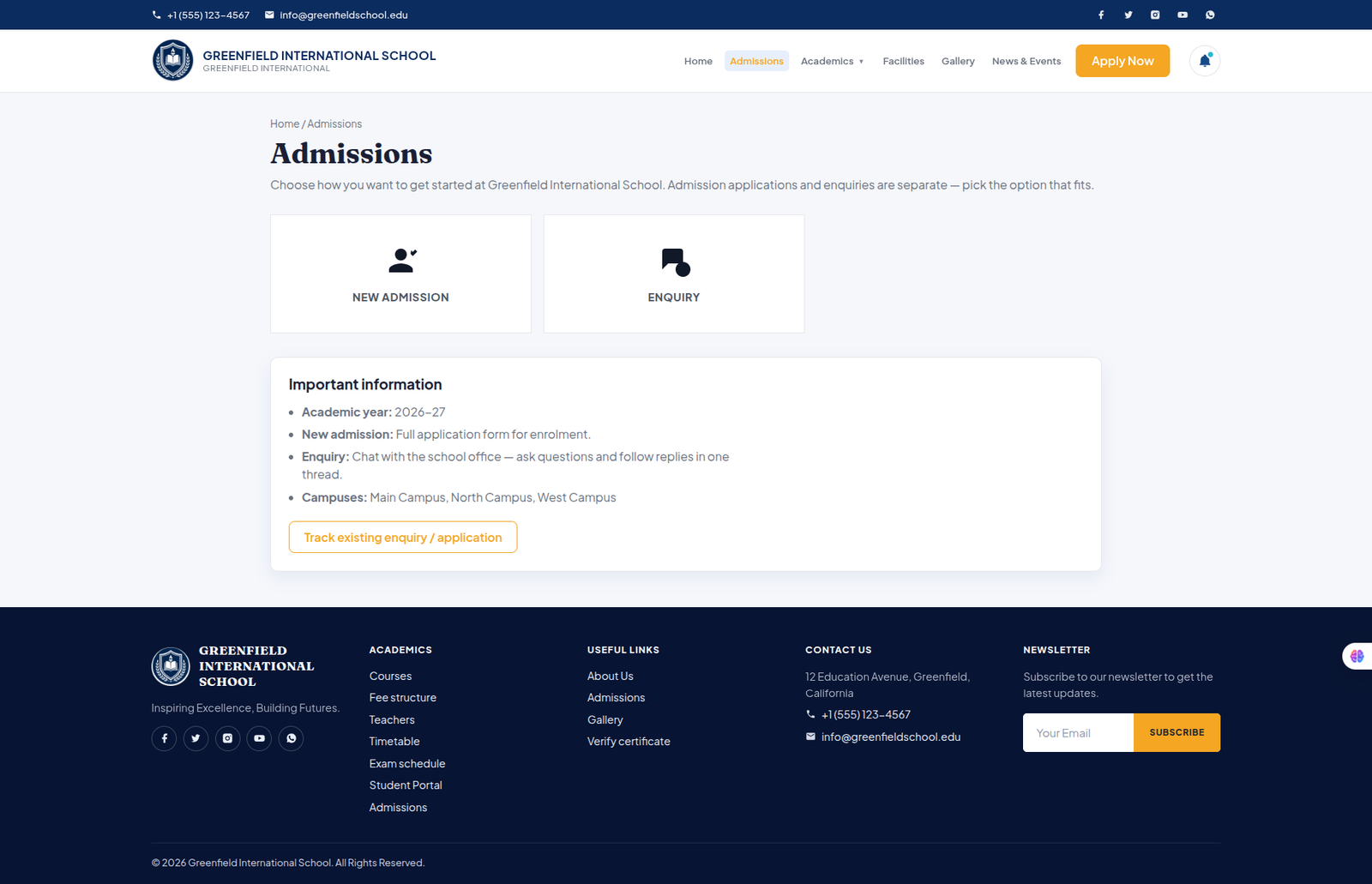
Admissions
Begin your journey at our school with a simple and transparent admission process designed to help students and parents get started with confidence.
- ✔ New admission application
- ✔ Easy enrolment process
- ✔ Academic year and campus details
- ✔ Admission requirements and information
- ✔ Application status tracking
- ✔ Simple and convenient admission experience
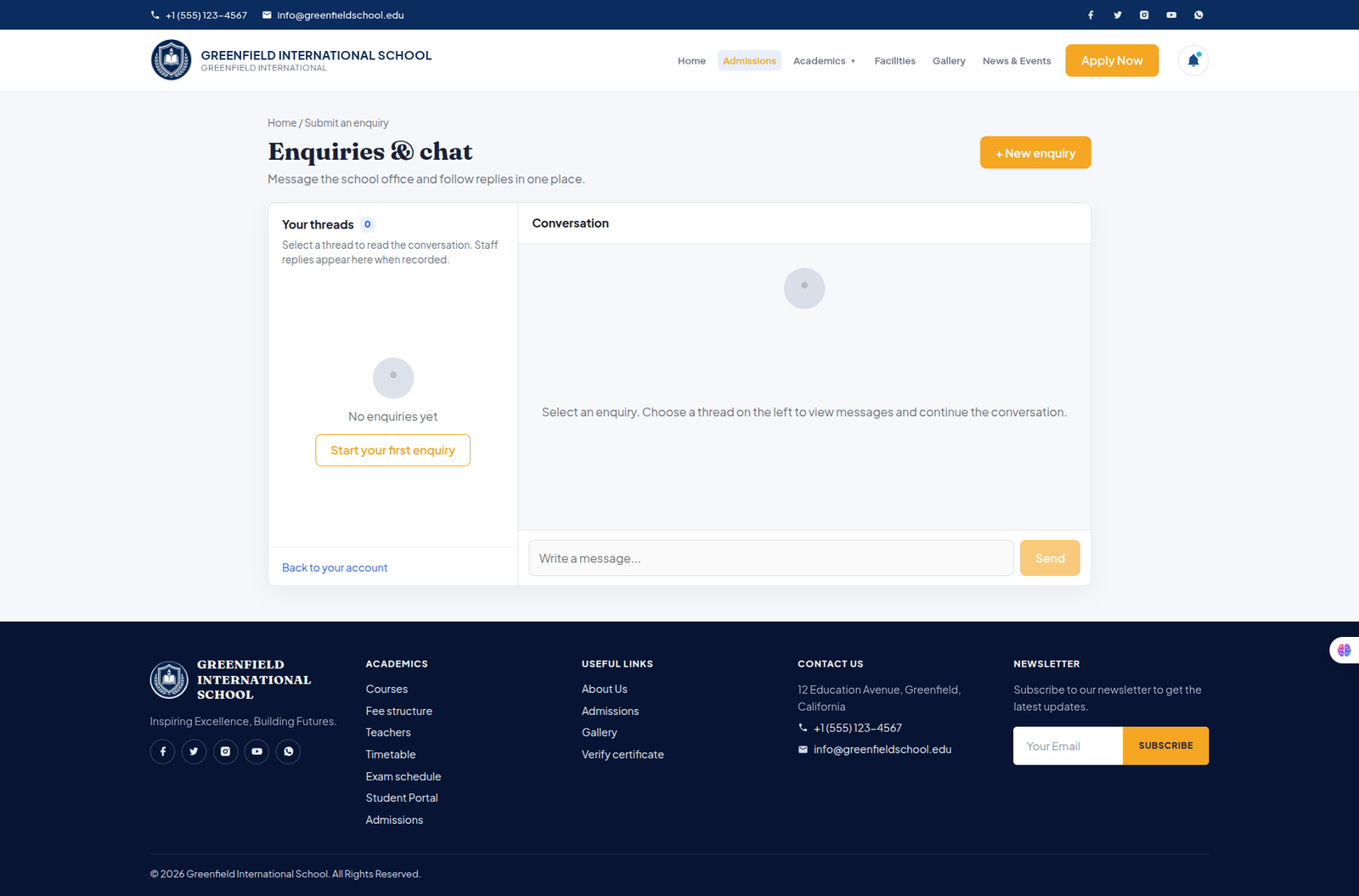
Enquiry
Have questions about admissions, courses, fees, or campus facilities? Submit an enquiry and connect with the school team for assistance.
- ✔ Submit admission enquiries
- ✔ Ask questions about courses and fees
- ✔ Get information about campuses
- ✔ Communicate with the school office
- ✔ Receive responses and updates
- ✔ Track your enquiry status
Gallery
Explore memorable moments and discover school life through a collection of photographs showcasing our campus, facilities, activities, and special events.
- ✔ Campus and school facilities
- ✔ Science and computer labs
- ✔ Sports and athletics activities
- ✔ Auditorium and cultural events
- ✔ Cafeteria and campus life
- ✔ Open Day and special events
- ✔ Sports Day highlights and memories
News & Events
Stay connected with the latest school news, events, achievements, activities, and important updates from our school community.
- ✔ Latest school news and announcements
- ✔ Upcoming school events
- ✔ Student achievements and activities
- ✔ News and event category filters
- ✔ Event dates and venue information
- ✔ Detailed updates with read-more links
- ✔ Keep parents and students informed
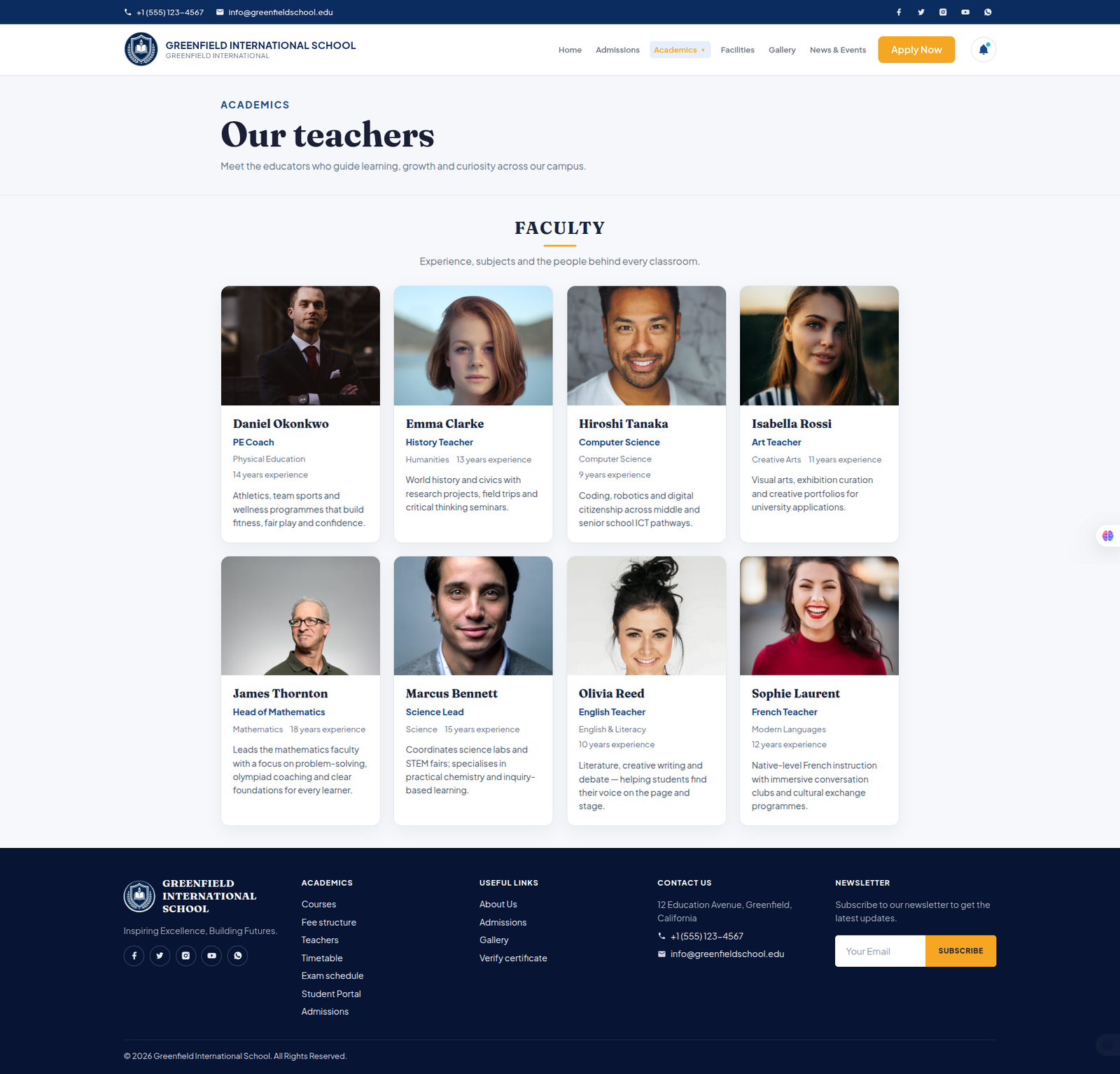
Teachers
Meet our experienced and dedicated faculty members who inspire learning, encourage curiosity, and support students throughout their academic journey.
- ✔ Complete faculty directory
- ✔ Teacher profiles and photographs
- ✔ Subject and department information
- ✔ Faculty experience and expertise
- ✔ Dedicated academic professionals
- ✔ Easy-to-browse faculty layout
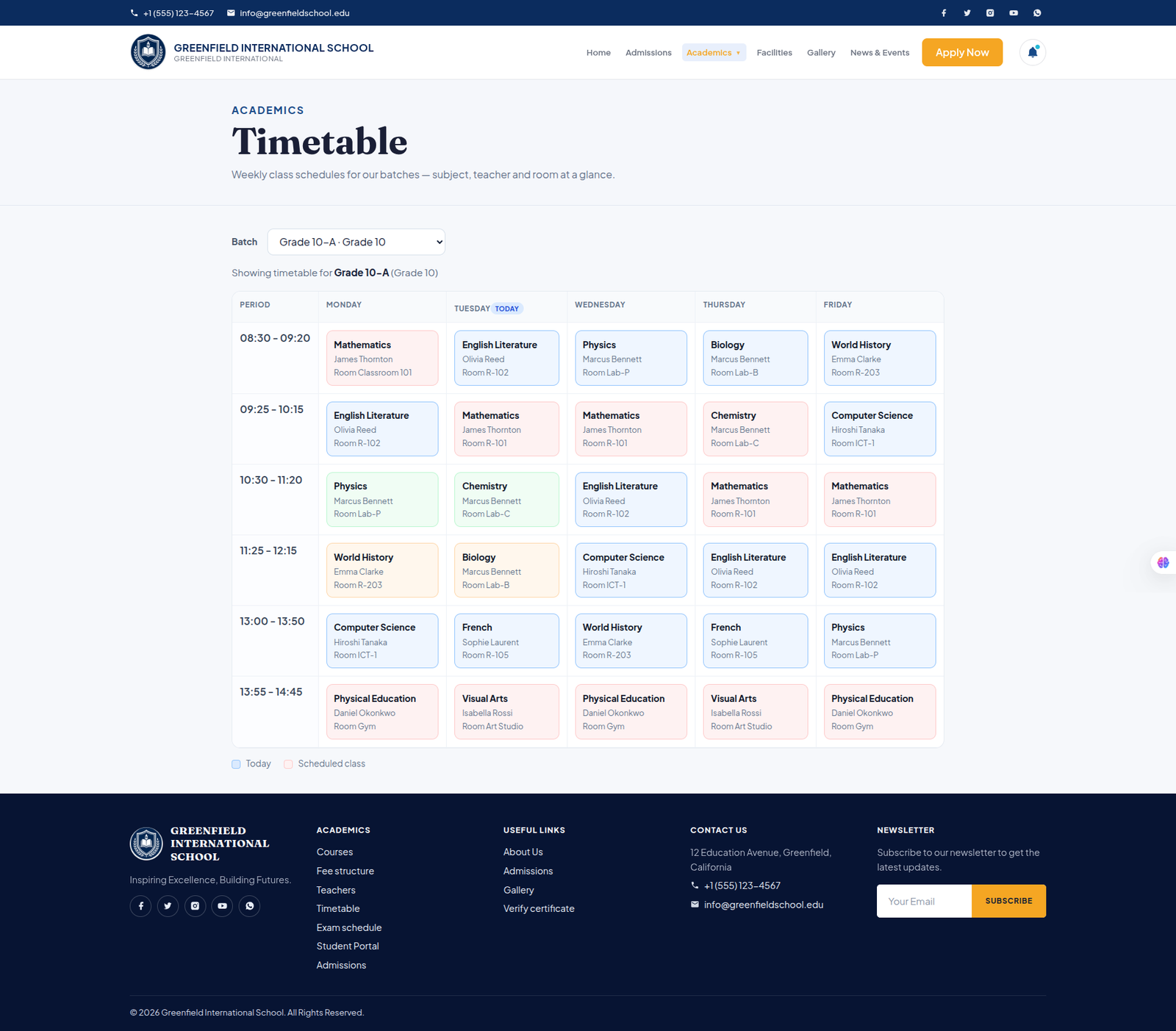
Timetable
View weekly class schedules for each batch with complete details about subjects, teachers, classrooms, and scheduled periods.
- ✔ Select timetable by batch or grade
- ✔ Weekly schedule from Monday to Friday
- ✔ View subjects and class periods
- ✔ Teacher and classroom information
- ✔ Clear time-based schedule layout
- ✔ Easily identify today's classes
- ✔ Color-coded scheduled classes
Courses & Programmes
Explore the school's academic pathways and programmes, with courses organized by campus, grade, subject, and study level.
- ✔ Browse available courses and programmes
- ✔ Filter programmes by campus
- ✔ View grade and subject information
- ✔ View course fees and fee structure
- ✔ Compare programmes across campuses
- ✔ Send course enquiries
- ✔ Apply directly to the selected programme
Fee Structure
Explore programme fees by course and campus with clear information about payment options, fee components, and yearly costs.
- ✔ View fees by programme and campus
- ✔ Monthly and yearly fee information
- ✔ Flexible payment frequency details
- ✔ Detailed fee components and breakdowns
- ✔ Compare fees across campuses
- ✔ View complete fee details
- ✔ Submit programme enquiries
Everything Students Need, in One Place
Give students a dedicated online space to access their dashboard, attendance, fees, assignments, and other supported services through a secure, personalized portal.
Student Dashboard
A personalized student dashboard that brings academic progress, daily activities, fees, communication, and important updates together in one convenient place.
- ✔ Personalized student profile and overview
- ✔ Today's timetable and upcoming classes
- ✔ Attendance overview and history
- ✔ Assignments and upcoming examinations
- ✔ Fee and payment information
- ✔ Messages, materials, and announcements
- ✔ Certificates and academic information
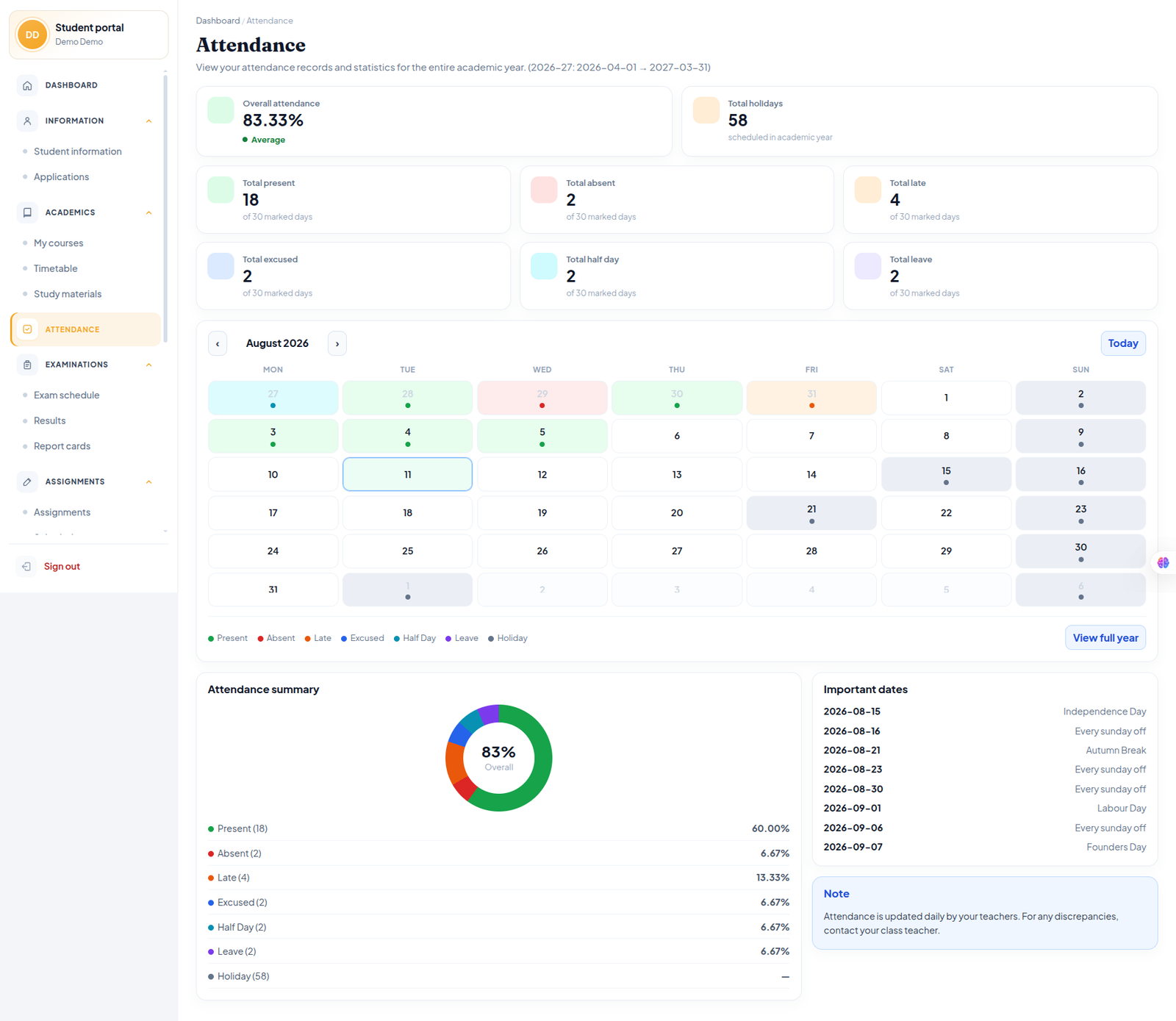
Attendance
Track attendance throughout the academic year with a clear overview of attendance statistics, daily records, and important attendance information.
- ✔ Overall attendance percentage
- ✔ Present, absent, late and leave records
- ✔ Excused and half-day attendance tracking
- ✔ Monthly attendance calendar
- ✔ Full-year attendance history
- ✔ Attendance summary with statistics
- ✔ Important dates and holidays
- ✔ Daily attendance updates and notes
Fee Schedule
View your complete fee schedule for the academic year, including payment details, due dates, outstanding amounts, and payment status.
- ✔ View total programme fees
- ✔ Track paid and outstanding amounts
- ✔ Monthly payment schedule
- ✔ View payment due dates
- ✔ Check paid and unpaid fees
- ✔ Pay outstanding fees online
- ✔ View detailed fee information
School Admin Panel
Manage Your Entire Institution From One Place
Take control of your school's day-to-day operations through a
centralized Admin Panel built to manage students, fees, attendance,
content, branding, settings, and other core management activities.
Manage Your Entire Institution From One Place
Take control of your school's day-to-day operations through a centralized Admin Panel built to manage students, fees, attendance, content, branding, settings, and other core management activities.
Admin Dashboard
Get a complete overview of school activities, students, staff, attendance, admissions, and finances from one centralized dashboard.
- ✔ Overview of students and active enrolments
- ✔ Teacher and staff information
- ✔ Admissions and enquiry activity
- ✔ Fee collection and outstanding amounts
- ✔ Invoice and payment status overview
- ✔ Attendance and academic activity tracking
- ✔ Quick links to frequently used modules
- ✔ Recent fee payments and activity updates
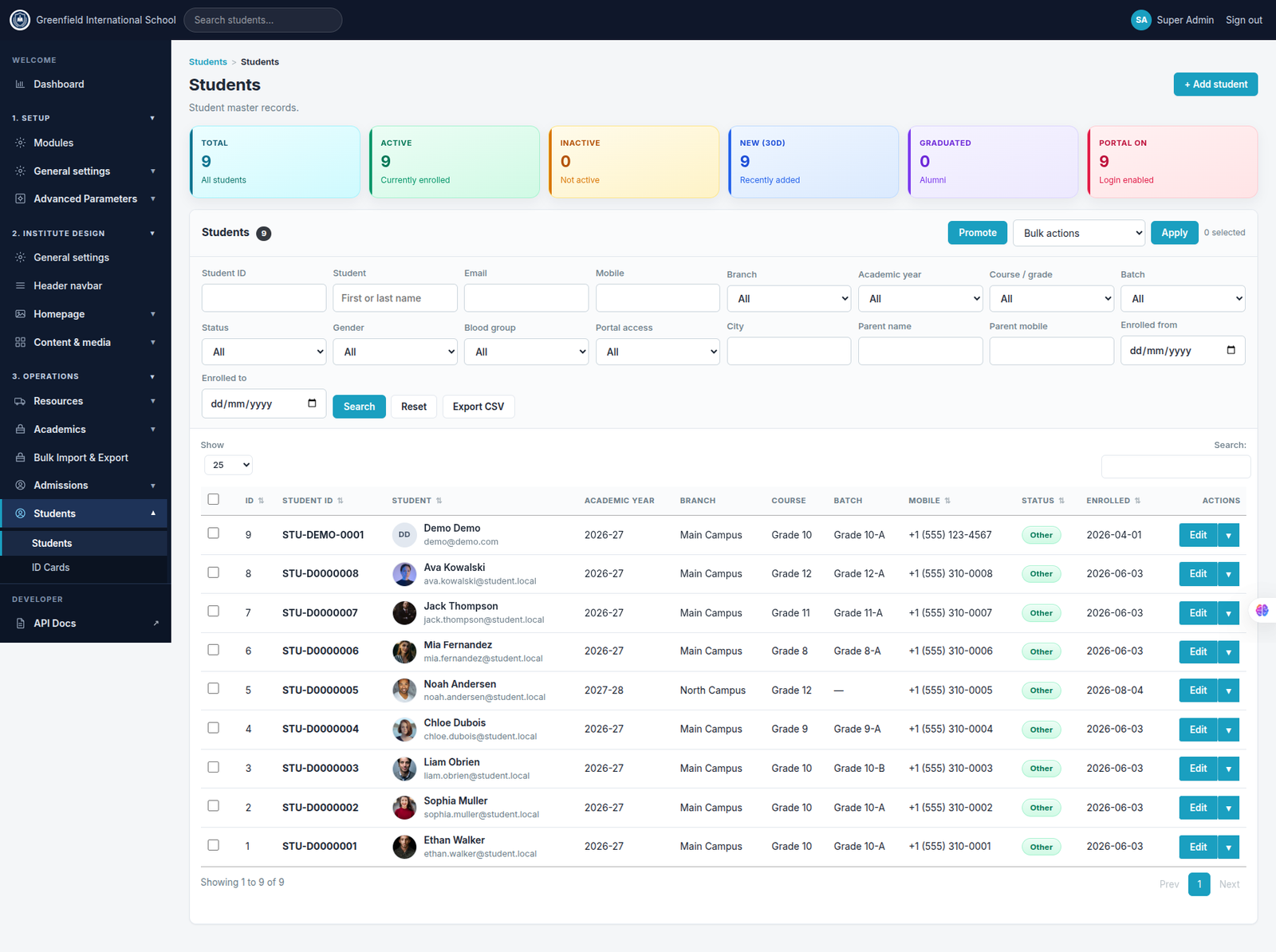
Students
Manage student records from one centralized page with powerful search, filtering, enrolment, and student management tools.
- ✔ View total, active, inactive and new students
- ✔ Search students by name, ID, email or mobile
- ✔ Filter by branch, academic year, course and batch
- ✔ Filter by status, gender and portal access
- ✔ Add and edit student records
- ✔ Promote students and perform bulk actions
- ✔ Export student records to CSV
- ✔ Manage student portal access
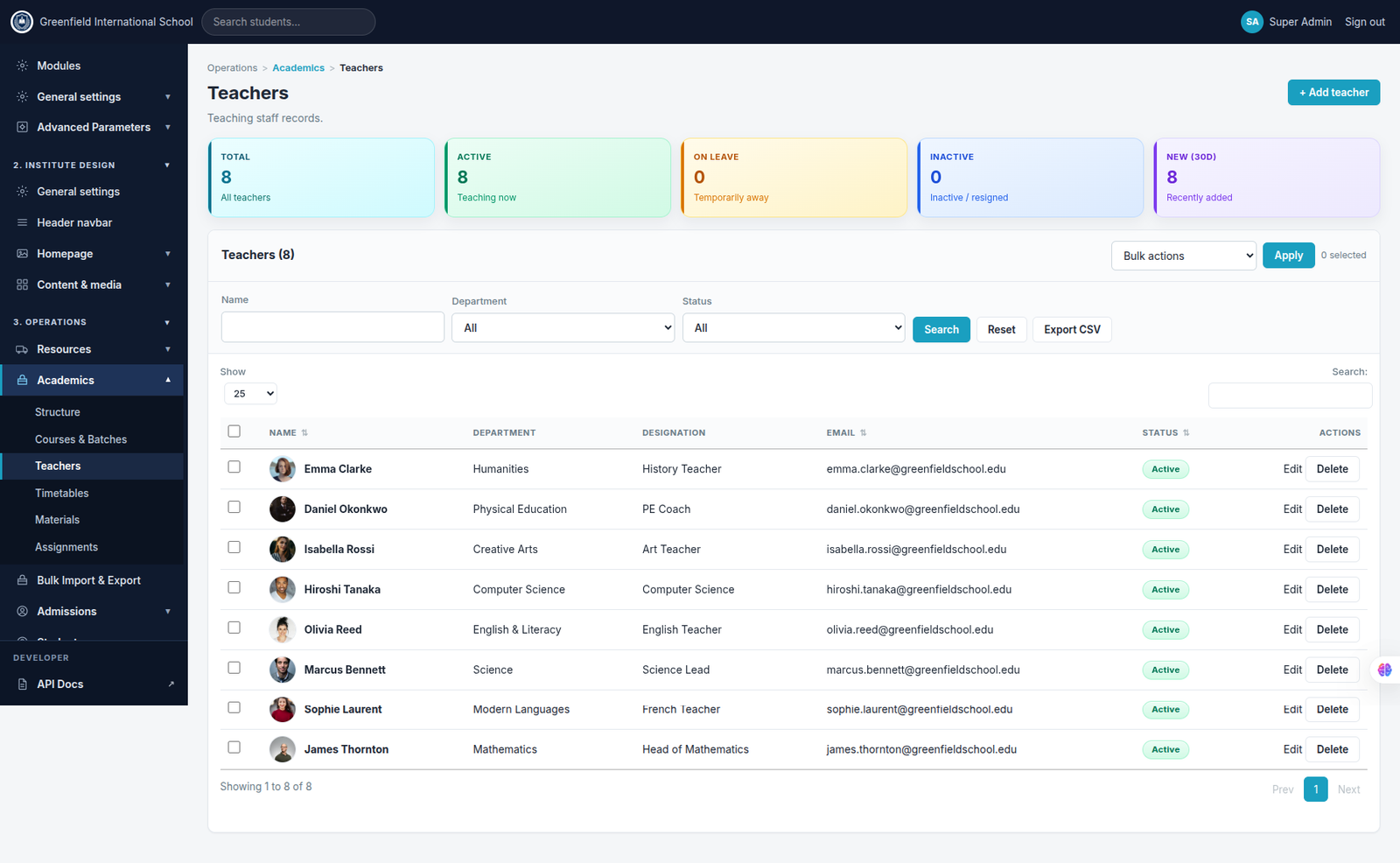
Teachers
Manage teaching staff records from one centralized page with easy access to teacher information, departments, designations, and employment status.
- ✔ View total, active and inactive teachers
- ✔ Track teachers currently on leave
- ✔ Search teachers by name
- ✔ Filter teachers by department and status
- ✔ View teacher department and designation
- ✔ Add and edit teacher records
- ✔ Manage teacher employment status
- ✔ Export teacher records to CSV
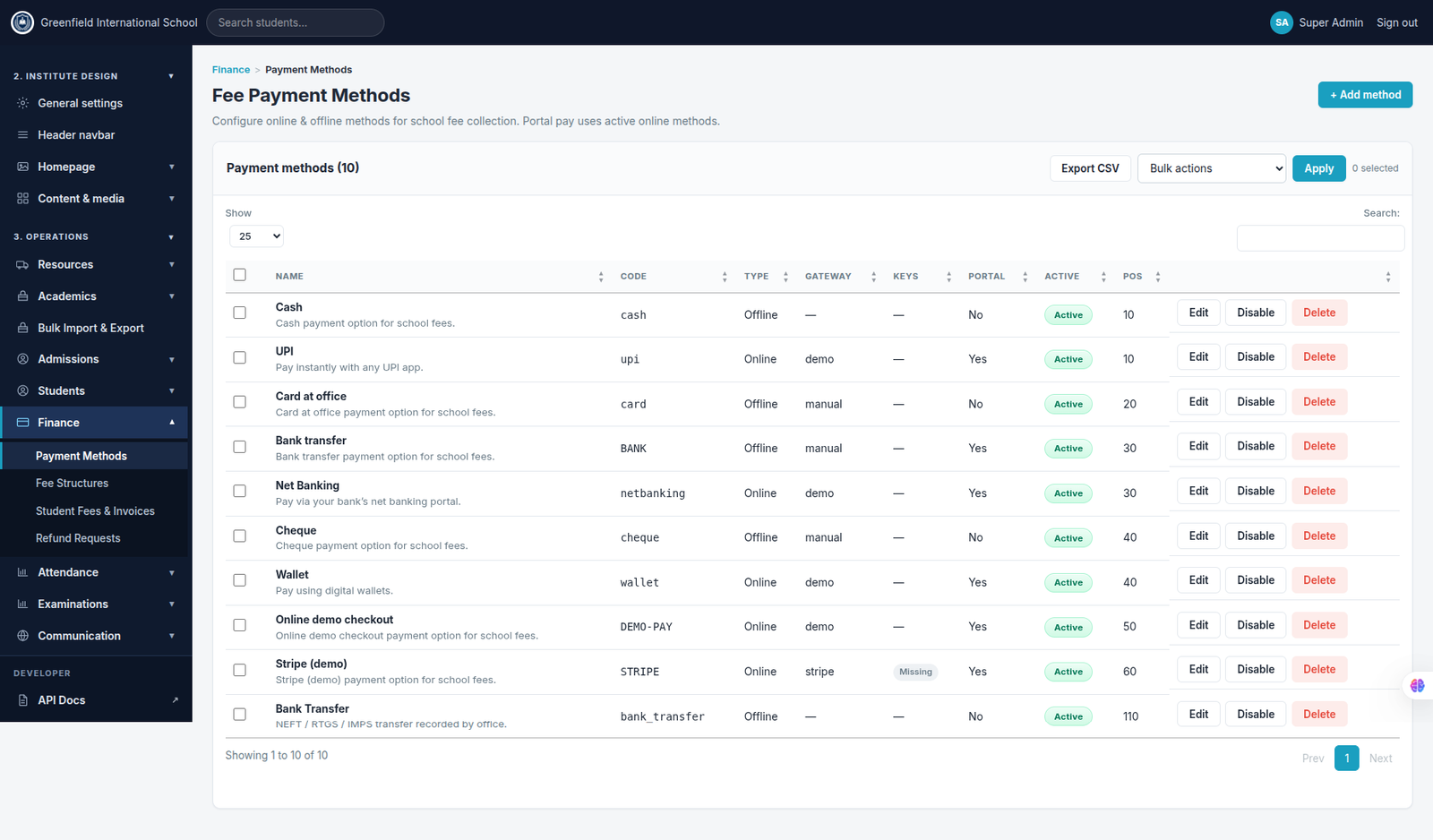
Payment Methods
Configure and manage the payment methods available for school fee collection, including online and offline payment options.
- ✔ Add and configure payment methods
- ✔ Support online and offline payments
- ✔ Configure payment gateways and codes
- ✔ Enable payment methods for student portal
- ✔ Manage UPI, cards, bank transfers and wallets
- ✔ Activate or disable payment methods
- ✔ Edit existing payment configurations
- ✔ Export payment method records to CSV
Fee Structures
Create and manage reusable fee structures for different courses, batches, and academic years with flexible payment options and detailed fee components.
- ✔ Create and manage fee structures
- ✔ Assign fees to courses and batches
- ✔ Configure academic year and branch
- ✔ Set monthly or yearly payment frequency
- ✔ Configure annual and monthly fee amounts
- ✔ Select available payment options
- ✔ Track students assigned to each structure
- ✔ Search, filter, edit and export fee records
Student Fees & Invoices
Manage student fees, invoices, payments, and outstanding balances from one centralized finance dashboard with complete collection tracking.
- ✔ View generated, collected and outstanding fees
- ✔ Track pending and overdue invoices
- ✔ Monitor student-wise fee balances
- ✔ Track paid, partial and pending payments
- ✔ Filter by academic year, branch, course and batch
- ✔ Search invoices and student payment records
- ✔ Manage invoices, payments and financial ledger
Attendance Management
Manage daily attendance for students and teachers with easy roll-call tools, attendance records, and a complete attendance register.
- ✔ Mark daily student attendance by batch and subject
- ✔ Record teacher attendance and staff presence
- ✔ Mark Present, Absent, Late, Leave and Half Day
- ✔ Add remarks to individual attendance records
- ✔ Mark all students or teachers at once
- ✔ Save and manage daily attendance records
- ✔ View the complete attendance register and history
Exams & Results
Manage examinations, record student results, and generate professional report cards with complete academic performance details.
- ✔ Create and manage examination schedules
- ✔ Configure exams, subjects and batches
- ✔ Enter and manage student marks and results
- ✔ Track subject-wise academic performance
- ✔ Calculate grades, percentages and overall results
- ✔ View published results for students
- ✔ Generate detailed student report cards
- ✔ Review and download academic reports
Explore the School Management Experience
Discover how our complete school management platform makes everyday academic and administrative tasks simple, organized, and accessible for everyone.
Ready to Launch Your School Management Platform?
Explore the complete solution, review its features and architecture, or discuss your deployment requirements with our team. Get your institution ready for a connected digital experience.
Explore Solution Contact UsAI-powered school, coaching and institute management solution with web, mobile, student portal and centralized administration.