Odoo Custom Price

€35.00
Tax excluded

Custom Price for Odoo allows customers to enter their own price on the website while ensuring minimum price control. Admins can enable custom pricing from the product form and set minimum limits using Fixed or Percentage rules, including variant-level configuration. The entered price is validated in real time, reflected in the cart, and carried to the sales order automatically. It supports products, services, combos, and is ideal for flexible pricing, donations, and controlled discount management in eCommerce.

WATCH DEMO VIDEO

Technical Support
Quantity
  Return policy

10-day module exchange guarantee

  • Enable customers to set their own product price on the website while maintaining strict minimum price control in Odoo.
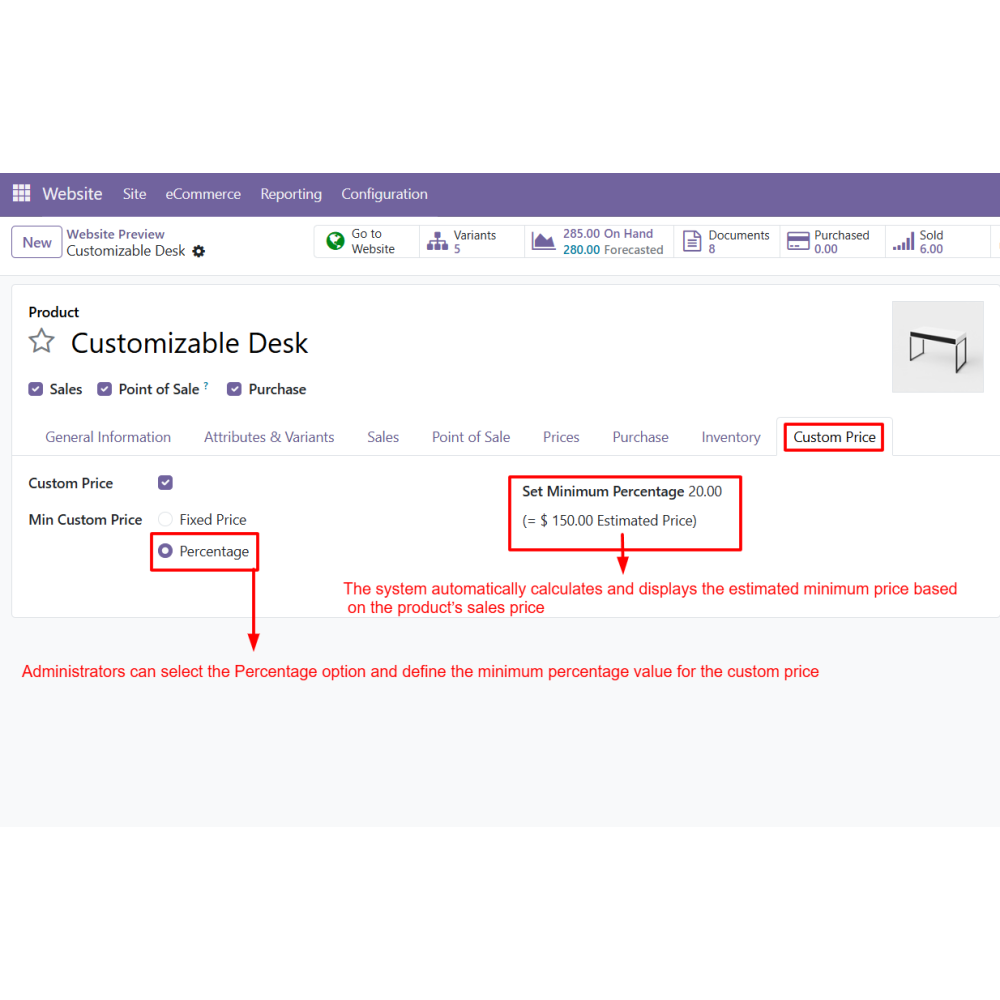
  • Configure custom pricing rules directly from the product form using fixed or percentage-based limits.
  • Validate customer-entered prices in real time and ensure compliance with minimum pricing rules before checkout.
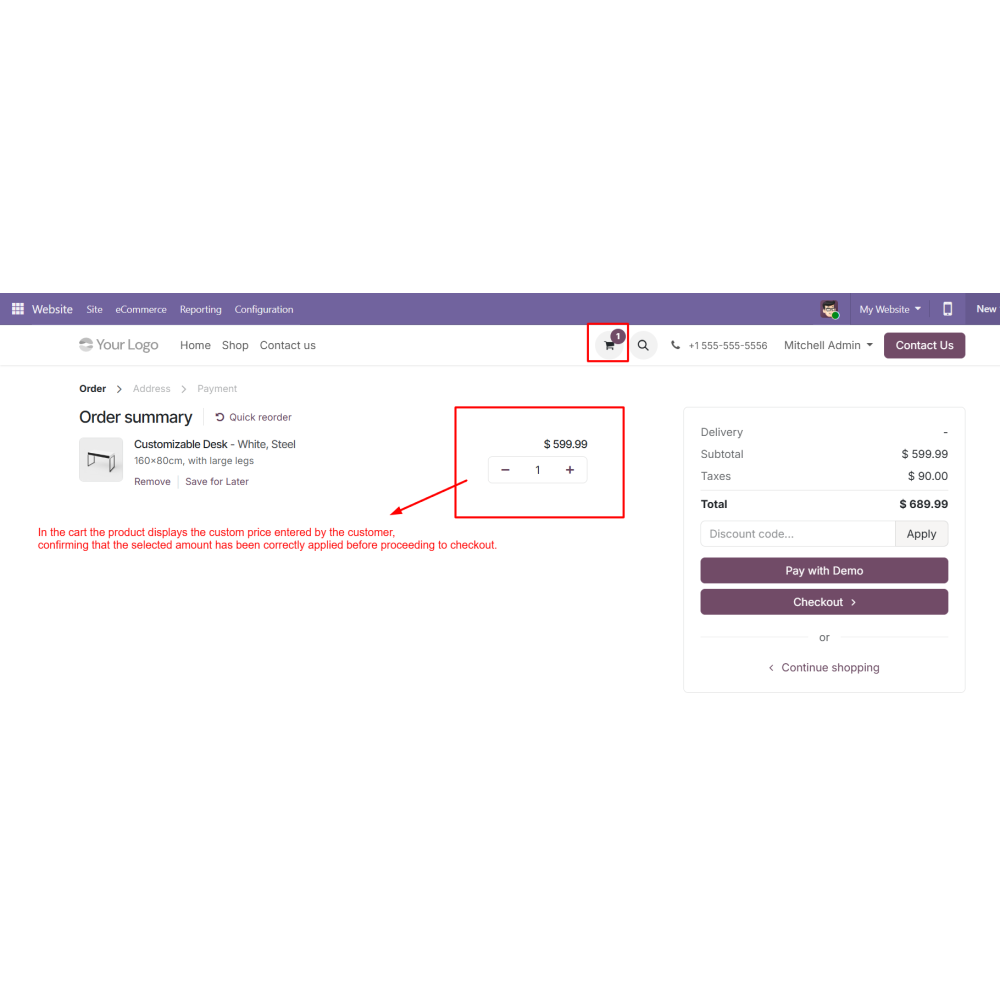
  • Automatically apply the custom price to cart and sales orders without manual intervention.
  • Support flexible pricing models suitable for eCommerce, donations, and negotiable pricing strategies.
  • Manage product and variant-level pricing efficiently with full control over pricing behavior in Odoo.
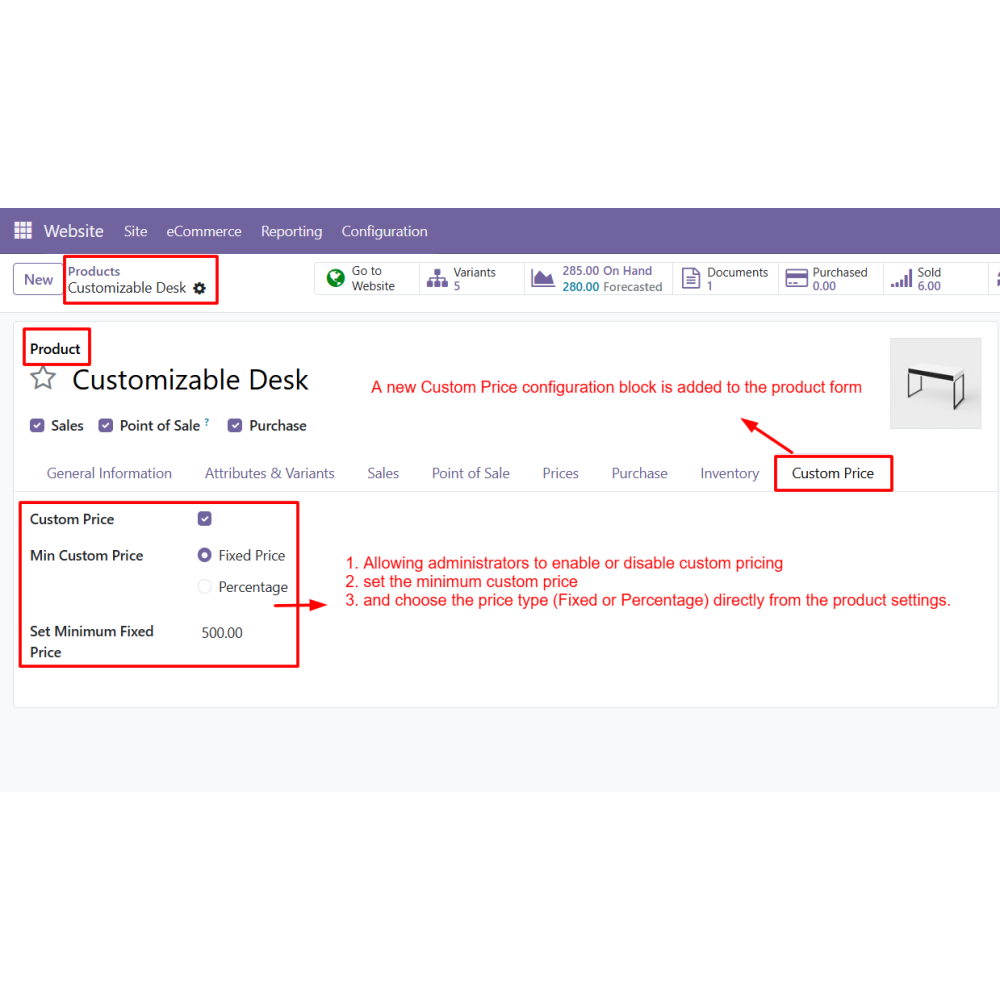
  • Enable or disable custom pricing from the product form for complete admin control.
  • Set minimum price using fixed value or percentage-based calculation rules.
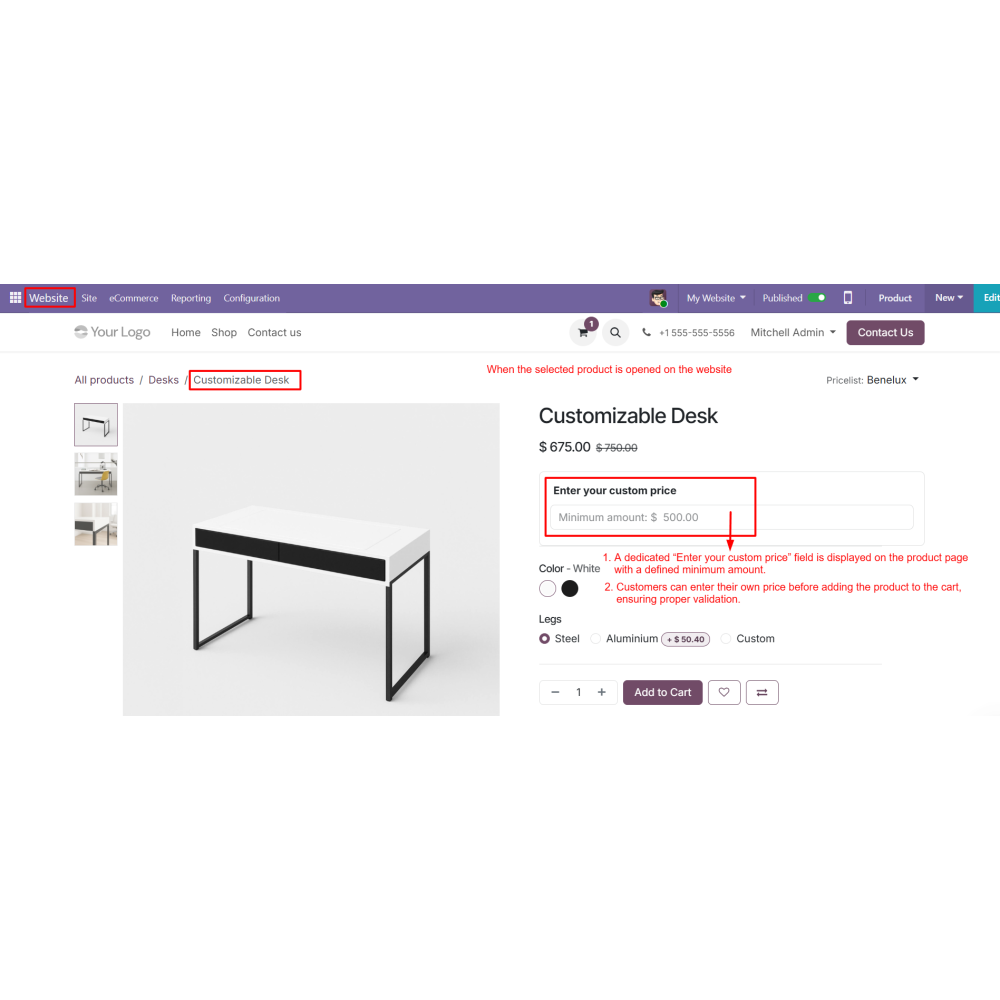
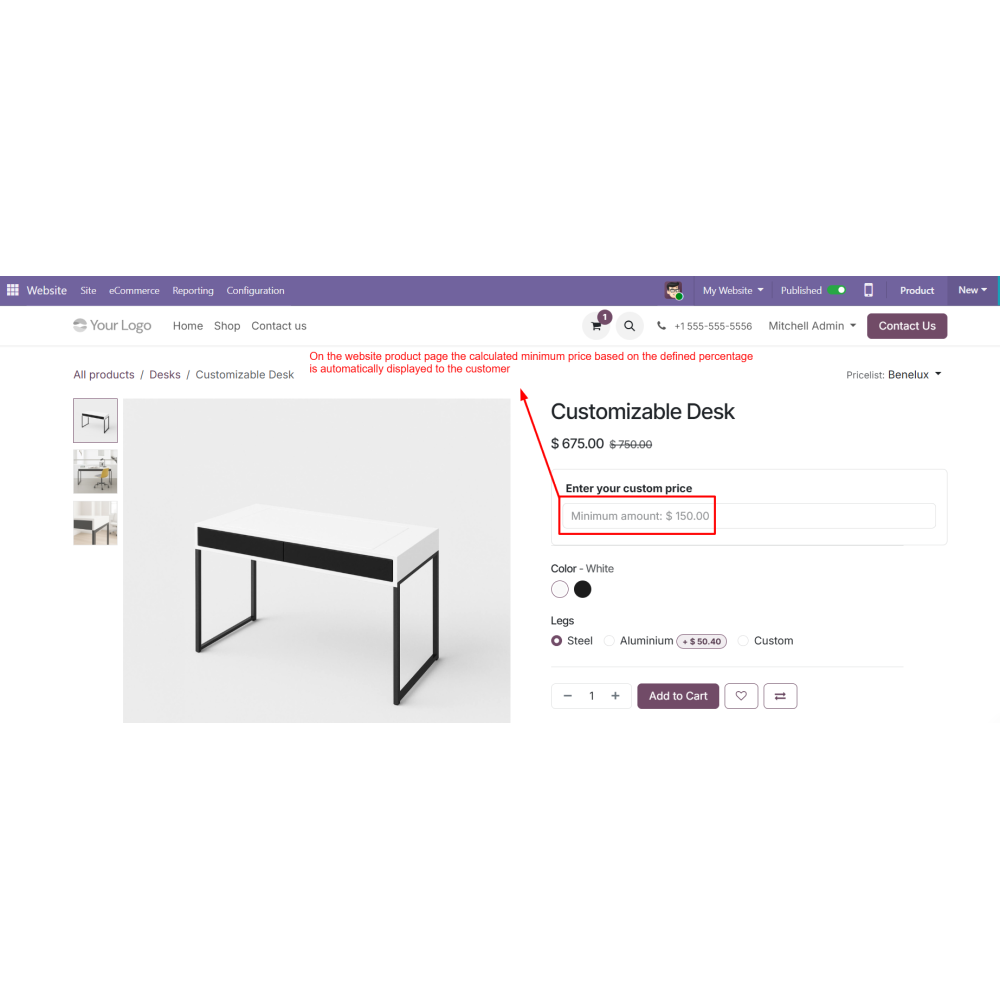
  • Allow customers to enter custom prices directly on the product page.
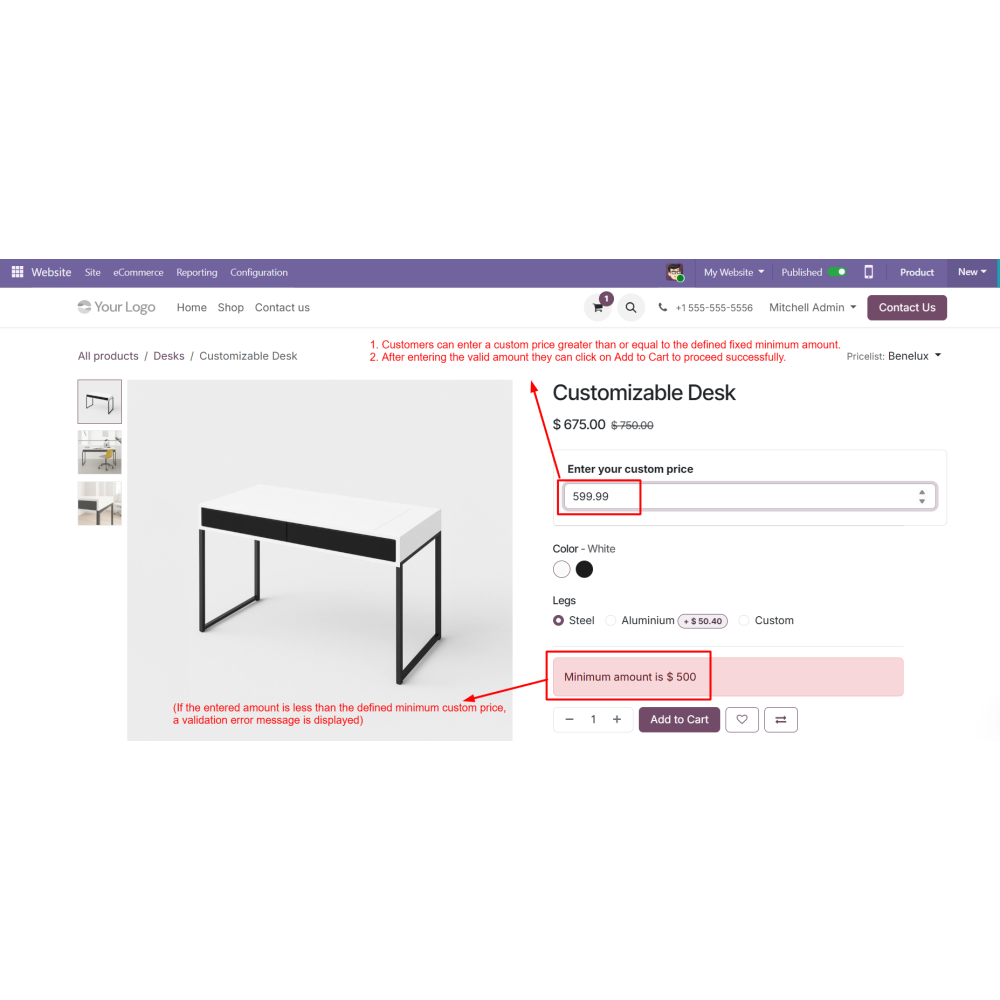
  • Validate entered price instantly and restrict checkout if below minimum limit.
  • Automatically transfer custom price to cart and sales order.
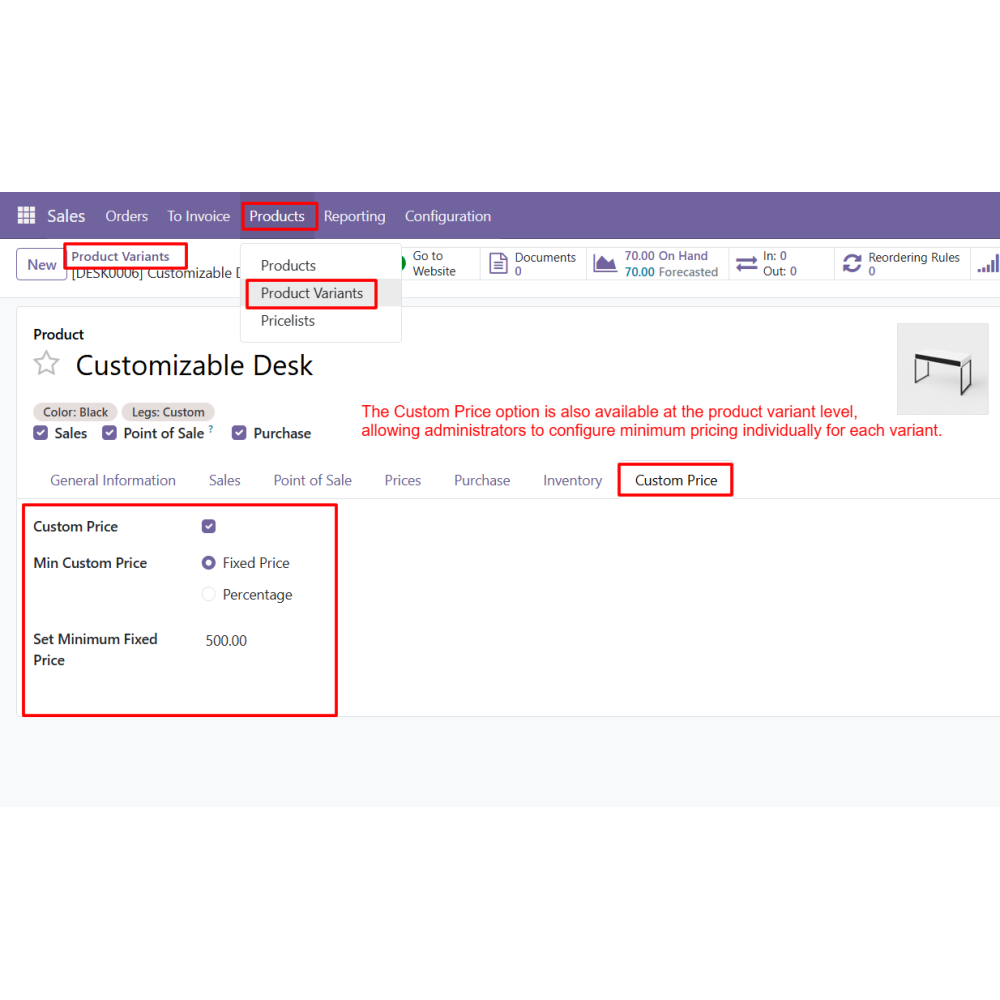
  • Configure separate pricing rules for each product variant.
  • Increase customer engagement by offering flexible pricing options.
  • Protect profit margins with strict minimum price enforcement.
  • Improve conversion rates with user-driven pricing flexibility.
  • Reduce manual effort through automated price application in orders.
  • Support multiple business models like donations and negotiable pricing.
  • Enhance overall shopping experience with seamless website integration.
  • Go to the product form and enable the Custom Price option.
  • Define the minimum custom price as Fixed or Percentage.
  • Save the product to apply the configuration.
  • Open the product on the website.
  • Enter the desired custom price in the input field.
  • Make sure the entered amount is equal to or greater than the minimum price.
  • Click Add to Cart to proceed with the selected custom amount.
  • Complete checkout and confirm the sales order with the custom price applied.
What is Custom Price for Odoo?Custom Price for Odoo allows customers to set their own product price on the website with minimum price control defined by the administrator.
Can customers enter any price on the product page?Yes, customers can enter a custom price, but it must be equal to or higher than the defined minimum price.
How is the minimum price configured?Administrators can set minimum price rules using either a fixed value or percentage of the product’s sales price.
Does it support product variants?Yes, custom pricing rules can be configured separately for each product variant.
Is the custom price applied automatically in orders?Yes, the entered price is automatically applied to the cart and sales order without manual updates.
What happens if the entered price is below minimum?The system shows a validation error and prevents the product from being added to the cart.
Which product types are supported?It supports storable products, services, combo products, and standard eCommerce items.

Customer reviews

0.0 Out Of 5
5 star
0%
4 star
0%
3 star
0%
2 star
0%
1 star
0%

No customer reviews

Benefits Of Custom Price

Flexible Customer Pricing

Minimum Price Protection

Increased Sales Opportunities

Controlled Discount Limits

Seamless Website Integration

Variant-Level Price Control

Features of Custom Price

Custom Price Configuration in Product Form

Adds a dedicated Custom Price block in the product form where admins can enable/disable the feature, set minimum custom price, and choose Fixed or Percentage pricing type.

Website “Enter Your Custom Price” Field

Displays a custom price input field on the product page, allowing customers to enter their own amount before adding the product to the cart.

Fixed Minimum Price Validation

Prevents customers from entering an amount lower than the defined fixed minimum price by showing a validation error and blocking Add to Cart.

Percentage-Based Minimum Pricing

Allows admins to define a minimum percentage based on the sales price. The system automatically calculates the minimum allowed amount.

Automatic Cart and Sales Order Update

Applies the entered custom price in the cart and transfers the same amount to the sales order in the backend without manual changes.

Variant-Level Custom Pricing

Enables separate minimum custom price configuration for each product variant.

Power Up Your  Store — We Handle It All

Related products